Editorial research checked: 24 September 2026. This is documentation-based analysis; EasyFixGear has not tested these plugs during an outage. Check your exact model, region, hardware revision and firmware before relying on any offline feature.
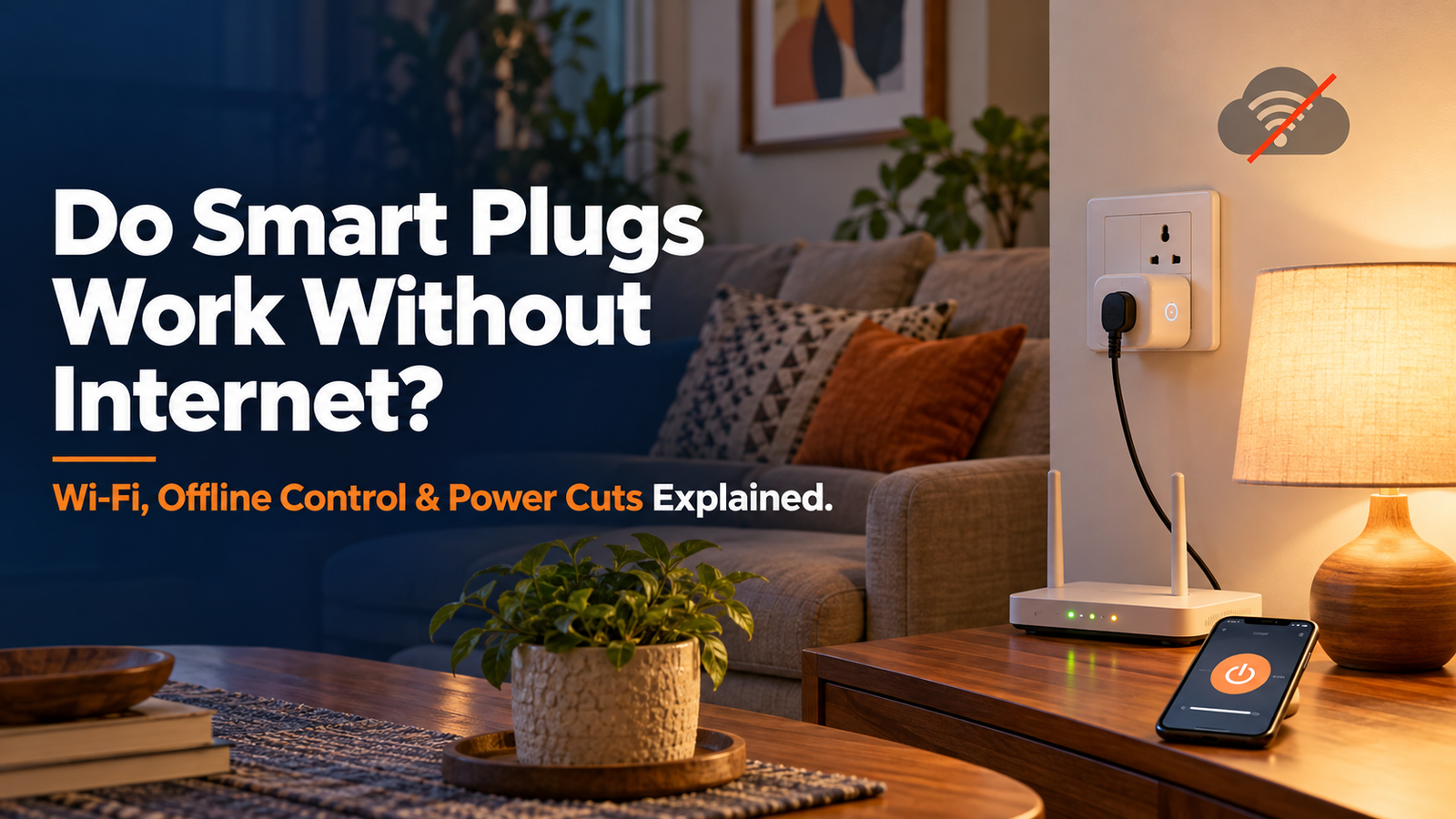
“If my internet goes down, will my smart plug still work?” If you are asking do smart plugs work without internet? The practical answer is sometimes, for some functions. A button on the plug may still turn a lamp on, a previously programmed schedule may still run, and certain apps may control the plug at home. Remote commands, cloud integrations and many voice commands may stop. The outcome depends on the plug, its software and which connection actually failed.
Do Smart Plugs Work Without Internet? Quick Answer
First check whether the plug has electricity, the router is broadcasting Wi-Fi, the internet service works, and the manufacturer’s cloud is available. These are four separate checks. “Offline” in an app does not tell you which failed.
| Situation | Physical button | App control at home | Existing schedule | Voice control | Control from away |
|---|---|---|---|---|---|
| Everything working | Usually works if fitted | Usually works | Usually works if configured | May work if integrated | May work if supported |
| Internet down; router/Wi-Fi powered | Usually works | May work: local capability required | May work: depends on where rule and clock live | Model/platform-dependent | Usually unavailable |
| Router or Wi-Fi down; plug has electricity | Usually works | Usually unavailable over Wi-Fi; Bluetooth exception possible | May work: device-stored rule with usable clock | Usually unavailable; local exceptions need another working path | Usually unavailable |
| Manufacturer cloud down; home internet works | Usually works | May work: local path or app may survive | May work: locally processed rules | Model/platform-dependent | Usually unavailable through affected cloud |
| Plug’s circuit has no power | Unavailable | Unavailable | Cannot switch anything now | Unavailable for that plug | Unavailable |
| Power restored | Usually works once plug starts | May work after reconnection | Model-dependent; clock may need resync | May work after services recover | May work after internet/cloud recover |
“Usually” describes a common design, not a promise for every model. For example, TP-Link documents local Tapo app control and locally running schedule/timer behaviour; Qubo documents a Bluetooth fallback. Neither example establishes what Wipro or any other plug does. TP-Link Tapo FAQ; TP-Link schedules FAQ; Qubo smart-plug FAQ.
Wi-Fi vs Internet vs Cloud: Why the Difference Matters
Think of electricity as the plug’s ability to operate. Wi-Fi is the local radio connection to your router; the router can still connect devices inside your home when the ISP connection is down. Internet is the connection from your home to outside services. The manufacturer’s cloud is a particular external service, which can fail even if other websites work. The app is your control interface; it may send commands locally or through a cloud server. A voice assistant is another interface with its own processing and integration requirements.
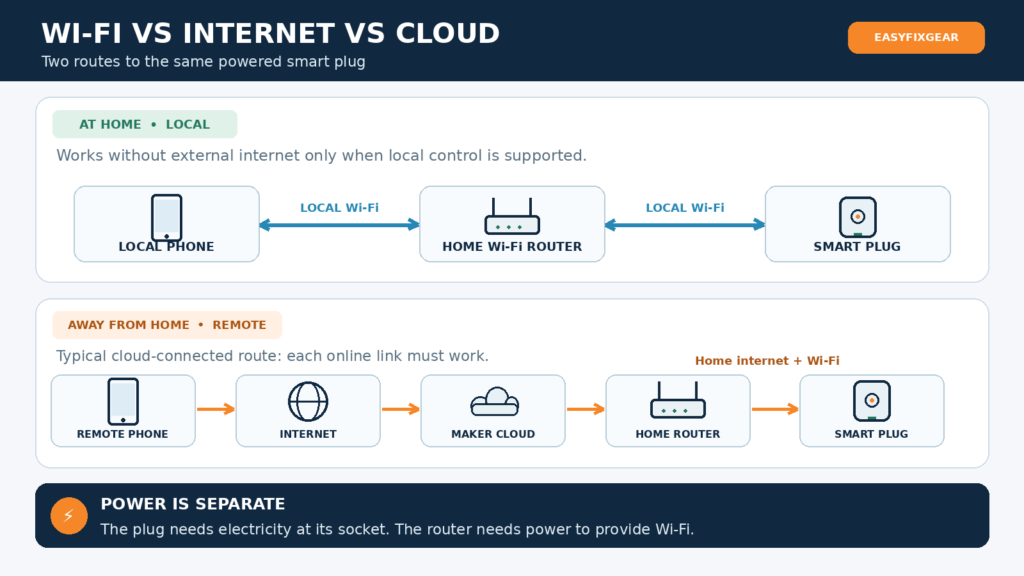
Potential local path: Phone ↔ home Wi-Fi router ↔ smart plug. This only controls a plug if its app/platform actually supports local commands. A phone using mobile data instead of home Wi-Fi is not following this path.
Typical cloud path: Remote phone → internet → manufacturer’s cloud → home internet → router → smart plug. An Alexa or Google integration can add the assistant’s own service to that chain.
A phone displaying “Connected to Wi-Fi, no internet” may still reach a compatible local plug. Conversely, a phone on mobile data may browse normally while it cannot reach a plug whose router is off. Local control means commands run inside the home without an external cloud; remote control means controlling the home from elsewhere and normally needs a working internet path. Google contrasts local Matter commands at home with cloud-mediated commands away from home. Google Home Matter control; Google Matter preparation.
What Happens If the Internet Goes Down but Wi-Fi Still Works?
Imagine a broadband outage while your router, phone, Tapo P110 and lamp still have power. TP-Link says its Tapo smart plugs can be controlled in the Tapo app on the local network without internet. Its schedule/timer FAQ says configured rules continue through internet loss, provided the device has not lost the correct time after a power cut. That does not mean a separate multi-device Smart Action runs offline; TP-Link says such actions may need a hub for local use, and its schedule guide distinguishes individual-device scheduling from internet-dependent multi-device automation. Tapo P110 India; Tapo FAQ; Tapo schedule guide; time resynchronisation FAQ.
For a different example, Qubo says configured schedules and timers still take effect if its plug loses internet and says its Wi-Fi + Bluetooth plugs can be controlled locally by Bluetooth when connectivity is lost. It does not establish that every app feature or Google/Alexa voice command works offline. Qubo’s older plug manual says its connected services require internet for normal operation; read the FAQ’s offline claims as specific fallbacks, not as an assurance that the full cloud experience continues. Qubo FAQ; Qubo 16A product.
Away-from-home app control through a manufacturer’s service normally stops while the home has no internet. Notifications, cloud automation and account-linked integrations may stall. Wipro advertises app, schedule and voice functions, but offline local app control, offline schedule storage and post-cut recovery are not clearly specified by the manufacturer on the public product page reviewed here. Do not transfer Tapo’s answer to Wipro. Wipro smart-plug page.
What Happens If Wi-Fi Stops Working?
If the router is off, a Wi-Fi smart plug cannot receive commands through that router, even if the phone has a mobile internet signal. The physical button may still switch a powered plug. A rule already running on the plug may still act, but it needs an accurate clock; a router outage is not the same as a power cut to the plug.
Exception: Qubo’s documented Bluetooth fallback can provide nearby app control for its supported Wi-Fi + BT plugs without Wi-Fi. You must be near the device and use the manufacturer’s supported workflow; Bluetooth is not the same as remote internet control. A hub/Thread or other local-radio system may behave differently again. Qubo FAQ.
What If the Smart-Plug Cloud Service Goes Down?
Here, your power, local Wi-Fi and broadband may all be fine, while the maker’s server or account service is unavailable. A cloud-routed app command, remote access or cloud-linked routine may fail. A supported local app path, physical button or existing device schedule may still operate. TP-Link’s documented LAN app route is an example of the distinction, not evidence that its every feature remains available. Google describes conventional partner integrations that route a command through Google and partner cloud services, while Matter commands at home can take a local path. TP-Link Tapo FAQ; Google Matter preparation.
If one manufacturer’s app fails but other websites and appliances work, check its service status or support notices before changing your router settings. If a family member can switch the lamp at the plug, you have isolated at least the basic power/relay path.
Do Smart-Plug Schedules Work Without Internet?
Ask where the action is stored and executed: on the plug, on a powered home hub/local controller, or in a cloud service. A locally stored recurring schedule can survive loss of internet if the device retains power and knows the time. A cloud-triggered rule cannot reach a disconnected plug. A countdown and an “always turn off 20 minutes after switching on” feature may follow different implementations; check them separately.
TP-Link confirms its schedule, timer and Away Mode continue without internet, but warns that after a power outage a device must reconnect to the internet to resynchronise time or those functions will not continue. Its current guide says a multi-device schedule built as an automation requires internet. Qubo says its plug’s configured timer and schedule take effect without connectivity; its FAQ does not clearly specify clock recovery after a subsequent power cut. TP-Link timing FAQ; TP-Link schedule guide; Qubo FAQ.
| Function | Can it work with no internet? | What to check |
|---|---|---|
| Single-plug recurring schedule | May work | Stored rule, device clock, power and recovery after a cut |
| Countdown / auto-off timer | May work | Whether countdown is processed on plug; interruption rules |
| Sunrise/sunset schedule | Model-dependent | Location/time data, last computed time and resync requirements |
| Location/geofencing | Often needs internet | Phone location, platform service and command delivery |
| Alexa/Google voice routine | Platform-dependent | Voice handling, skill/Matter path and local processing |
| Sensor-triggered automation | Model-dependent | Sensor, hub, radio path and whether rule runs locally |
WiZ documents an instructive lighting example, not proof about every WiZ plug: its light schedules are held in the lights after configuration, but cloud access is needed to receive changes and check time; after loss of power without connectivity, the schedule may not run. The wider lesson is that “schedule stored locally” and “can recover its clock without internet” are separate claims. WiZ schedule FAQ.
Will Alexa or Google Home Control a Smart Plug Without Internet?
For an ordinary plug linked by a cloud skill/integration, expect voice commands to fail if the required internet or partner cloud is unavailable. TP-Link’s Kasa FAQ explicitly describes its Alexa and Google integration as cloud-to-cloud. Google describes that path for conventional “Works with Google Home” devices. TP-Link Kasa FAQ; Google Matter preparation.
Avoid the opposite blanket claim too: Amazon documents local Alexa integration designs that can continue controlling supported smart-home devices during an internet outage, and Google says Matter devices at home can receive local commands. Whether the spoken command is recognised offline by your particular speaker, language, software and setup is a separate question; local device transport does not guarantee offline voice recognition or routines. Use the plug’s button or a documented local app path as the predictable fallback. Amazon Local Adapter Platform; Google Matter control.
Does Matter Make Smart Plugs Work Better Offline?
Matter offers a standard local, IP-based control path between a compatible plug and controller on the home network. Google says at-home Matter commands are carried locally over Wi-Fi or Thread, while away-from-home commands use the cloud. A Matter-over-Wi-Fi plug still needs a functioning local Wi-Fi network; a Matter-over-Thread plug needs its working Thread network and suitable border router/controller. Google Home setup requires a compatible hub for its documented configuration. Apple’s current iPhone guidance allows adding and controlling Matter accessories from an iPhone with iOS 18 or later without a home hub, although a hub is recommended; remote Apple Home access has separate hub requirements. These are platform-specific differences. CSA Matter overview; Google Matter control; Google Matter preparation; Apple Matter setup; Apple Home troubleshooting.
Matter does not guarantee that setup, account sign-in, firmware updates, voice recognition, app extras, energy graphs or cloud routines work without internet. Verify the exact Indian model carries Matter support; a related overseas model number is insufficient.
What Happens to a Smart Plug After a Power Cut?
An internet outage leaves the plug powered. A power cut to its socket leaves it unable to switch or power the appliance. When electricity returns, three separate things must be checked: relay state (on, off or last state), network reconnection, and clock/schedule recovery.
TP-Link’s plug app guide describes selectable default states including last on-state, on and off, with a note that features vary by model. Its timing FAQ separately warns that schedules/timers need internet to resynchronise the device time after a power outage. Kasa documentation says settings survive a cut and some products restore their previous state; this does not establish the setting of every model. For Wipro and the Qubo products reviewed, a configurable power-on state and precise clock-recovery behaviour are not clearly specified by the manufacturer in the public pages cited here. TP-Link plug app guide, pp. 9–10; TP-Link timing FAQ; Kasa FAQ.
Router and plug can start at different speeds. The plug may have electricity before it has Wi-Fi; the router may have Wi-Fi before the ISP comes back; the cloud can take longer. A manual button working immediately does not prove that a timed automation has resumed. For anything capable of heating, moving or unsafe unattended restart, check the appliance’s own instructions and avoid enabling an automatic ON state without a specific safe use case.
What If Your Router Is on an Inverter or UPS?
In an Indian home with power backup, trace both circuits. If the router and the plug’s socket remain powered, a supported local-control path may remain available even while the ISP link is down. On the other hand, if the router stays on but the plug’s socket loses power, no app can make that plug energise its appliance. If the socket has backup but the router does not, a device-stored schedule or physical button may be available, depending on the model. Once power returns, check the state and clock before trusting a routine. Follow the backup system and appliance ratings; do not modify wiring to make a smart-plug routine work.
Can You Still Use a Smart Plug Manually?
Many models have a button on the body. TP-Link’s plug app guide shows the physical button, and Qubo’s plug instructions identify a device button; verify whether a short press toggles power on your model because a longer press may enter pairing or erase settings. With mains available, a button provides an accessible fallback when the app or cloud fails. It cannot help during a cut to the socket. TP-Link plug app guide; Qubo support.
Why Do So Many Smart Plugs Use 2.4 GHz Wi-Fi?
Many low-bandwidth IoT plugs use 2.4 GHz, which generally reaches further through indoor obstacles than 5 GHz. TP-Link identifies 2.4 GHz compatibility for Tapo plugs, and Qubo says its plugs use 2.4 GHz while working with routers that combine both bands under one network name. Your phone can often stay on 5 GHz after setup and control a 2.4 GHz plug through the same permitted local network; app setup and router isolation/band steering can complicate initial pairing. Check the exact pairing instructions before temporarily changing router bands. A 2.4 GHz connection tells you nothing by itself about whether the plug uses cloud commands. TP-Link Tapo FAQ; Qubo FAQ. A future EasyFixGear guide will cover 2.4 GHz vs 5 GHz Wi-Fi for smart-home devices in detail.
Smart Plug Offline: What Usually Still Works?
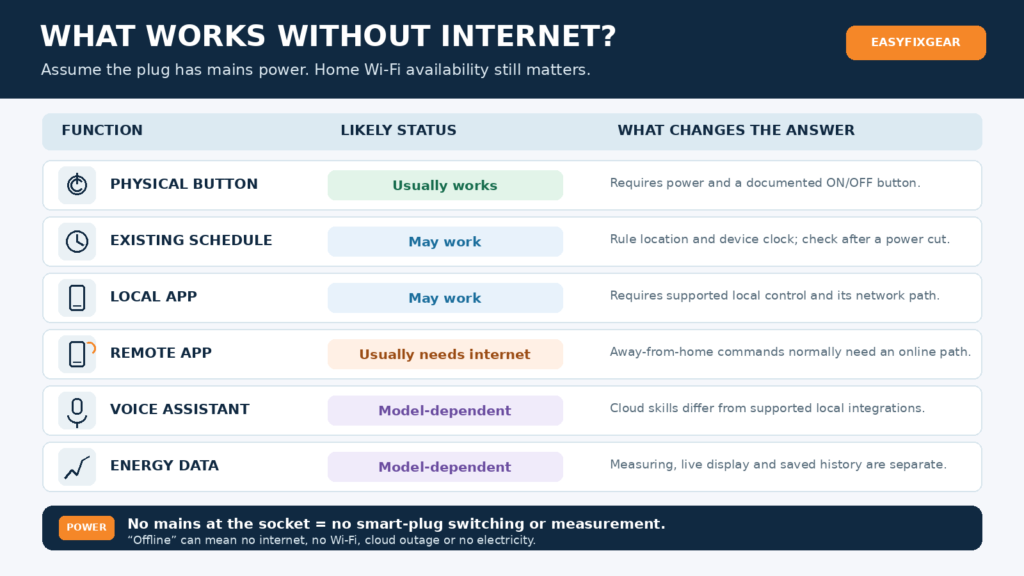
For this table, “no internet” means the plug still has mains power. Wi-Fi and any required local hub are treated separately. A “may” requires model-specific confirmation.
| Feature | Internet required? | Local Wi-Fi required? | Practical reading |
|---|---|---|---|
| Physical button | Usually no | No | Requires mains and an actual toggle button |
| Recurring plug schedule | May not be | May not be | Local rules can run if clock remains valid; after a cut, resync may be needed |
| Countdown timer | Model-dependent | Model-dependent | Timer may differ from recurring schedule; manual toggles can cancel it |
| Local app control | No, if supported | Usually yes for Wi-Fi model | Tapo documents LAN control; Qubo documents a Bluetooth exception |
| Remote app control away from home | Usually yes | Home network must connect to plug | Also needs relevant cloud/platform |
| Alexa / Google Voice | Model/platform-dependent | Depends on integration | Conventional linked skills often need internet; local exceptions exist |
| Current energy measurement | Hardware-dependent | No for measurement itself | Showing data in an app is a separate function |
| Real-time energy display | May not be | May be required | App path and model govern visibility |
| Historical energy data | Model-dependent | May be required | Ask where records live and whether gaps backfill |
| Notifications | Usually yes for remote push | Plug must communicate | Internet/cloud services usually carry push alerts |
| Firmware updates | Usually yes | Usually yes during update | Follow manufacturer instructions; avoid interrupted power |
| Matter local on/off | Not for an established local path | Yes for Wi-Fi Matter; Thread uses Thread | Working controller/network required; extra features differ |
Sources for the documented exceptions and qualifications: Tapo FAQ, TP-Link timing FAQ, Qubo FAQ, Google Matter control.
Does Energy Monitoring Work Without Internet?
Separate four steps: measuring electrical use, showing live watts in the app, saving history, and syncing or viewing history remotely. A powered plug with a meter may still measure electricity while its app cannot reach it. TP-Link documents live power and usage history for its P110/P115, but the cited energy guide does not clearly specify by model and firmware, whether every historical sample is retained and later backfilled after a combined network/power outage. Do not promise an uninterrupted graph. If energy records matter, inspect the app after reconnection and ask the manufacturer about retention, sampling and sync. Tapo energy guide; Tapo P110 India.
Smart Plug Not Working After an Internet or Power Outage? Try This
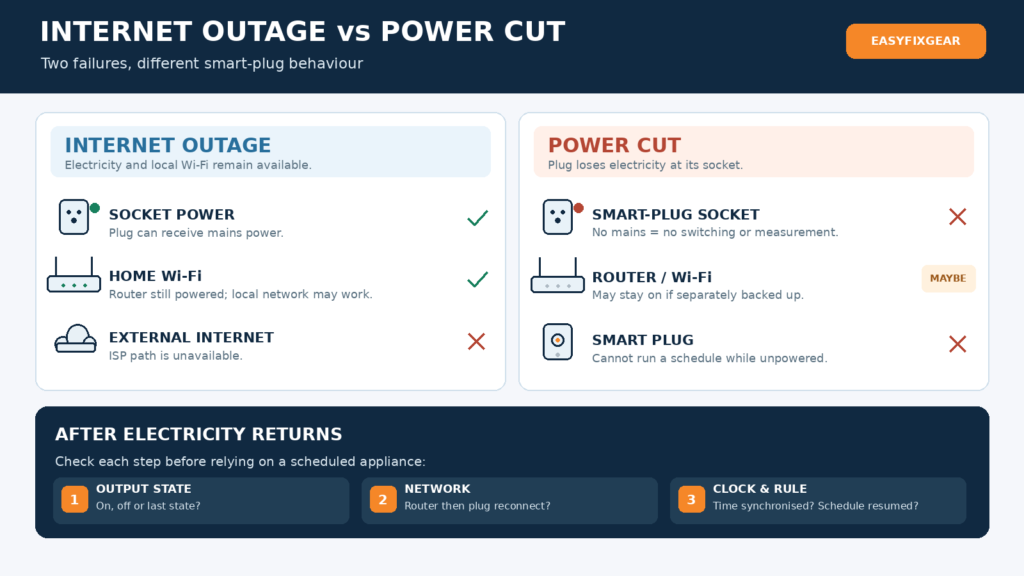
- Check mains safely. Is the wall switch on? Do other devices on that circuit have power? Stop if the socket is loose, damaged, sparking, burnt or abnormally hot; consult a qualified electrician.
- Observe the plug. Does its indicator respond? Can its documented short button press switch a harmless connected lamp? A nonresponsive button with confirmed socket power points to a plug issue.
- Check the router. Is Wi-Fi being broadcast? Are other devices connected? A working mobile-data connection proves little about your home network.
- Check the ISP separately. On a phone connected to home Wi-Fi, temporarily disable mobile data and load a website. Wi-Fi with no internet is a useful diagnosis, not the same as a dead router. Google’s network check.
- Put the phone on the intended home network. Disable VPN/guest-network isolation temporarily only according to your router’s instructions if local discovery is blocked; restore your chosen security settings afterwards.
- Allow reconnection time. Let the router and broadband link start; the plug may join after them. Check its LED meaning in the exact manual.
- Try the maker’s app. If the button works but the app says offline, compare local control at home with remote control on mobile data. A difference can isolate a cloud/internet path.
- Check manufacturer/platform notices. If broadband and local Wi-Fi work, an account, cloud or Alexa/Google integration may be the failed link.
- Check time and recovery settings. After a power cut, confirm the plug’s output state and whether its schedule resumed at the correct time.
- Reset last. Follow model-specific restart, router-change or re-pair instructions only after diagnosis. Factory reset can erase pairing, schedules and preferences. Never open or repair a mains-voltage plug. TP-Link offline troubleshooting; TP-Link Tapo FAQ.
Why Isn’t My Smart Plug Working? Quick Decision Tree
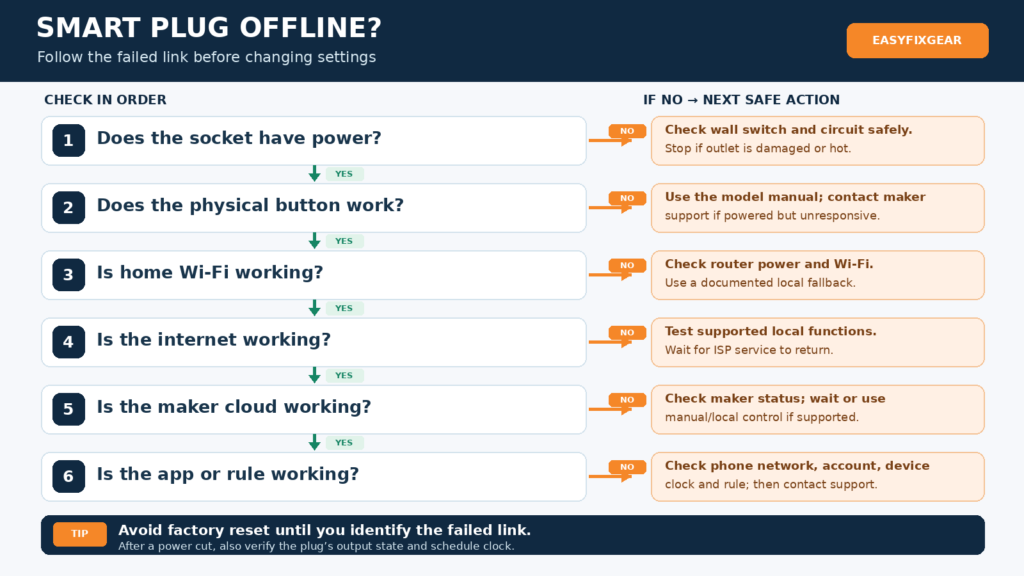
- Does the plug’s socket have electrical power? No → check switch/circuit safely; stop at damaged hardware. Yes → continue.
- Does its documented physical button toggle a suitable lamp? No → consult model manual/support; possible plug issue. Yes → basic powered switching works.
- Is the home Wi-Fi network working? No → check router power and Wi-Fi; use supported button/Bluetooth or device-stored schedule if available.
- Is the home internet working? No → test documented local functions; do not interpret app “offline” as proof of plug failure.
- Is the manufacturer’s platform working? No → wait for restoration; use a supported local/manual fallback.
- All paths working? Check phone network, app permission/account, device connection, rule, clock and voice integration; then contact support with model/firmware and LED status.
When Should You Care About Offline Smart-Plug Control?
It matters for homes with frequent ISP outages, unreliable routers, planned lamp or holiday-light schedules, remote properties and households where someone needs a clear physical fallback. Be especially cautious about using a plug to switch the very router that supplies its network: if the rule meant to turn the router back on needs connectivity or a resynchronised clock, you can strand it in the OFF state. Confirm a documented, independent recovery path before trying such a setup.
Consumer smart plugs must not be the sole control mechanism for medically essential or safety-critical equipment unless explicitly designed and certified for that purpose. Also check whether the connected appliance is suitable for unattended switching or automatic restart.
What to Look for If Offline Reliability Matters
Before buying, ask support for the exact Indian model and revision:
- Is there a physical ON/OFF button, and what does a short press do?
- Can the maker’s app switch it when broadband is down but Wi-Fi is up? What if Wi-Fi itself is down?
- Are recurring schedules and countdowns stored and executed on the plug, hub or cloud? Can they recover their clock after mains loss without internet?
- Can you choose off, on or previous state after power returns? What is the factory default?
- Is Matter supported on this precise model, and which powered controller or Thread border router is needed?
- Does it reconnect to a router using the same network name and password? What happens after a password change?
- Which energy history, notifications and rules still work if the cloud is unavailable?
- Are firmware support, a readable manual and India support available?
For matching a plug to an appliance, socket, load and ecosystem, use EasyFixGear’s best smart plugs in India buying guide. For a broader system choice, see best smart-home devices in India and smart home on a budget in India.
Common Smart-Plug Connectivity Myths
| Myth | Better answer |
|---|---|
| “Wi-Fi and internet are the same.” | The router’s home network can work while the ISP connection is down. |
| “Every Wi-Fi plug becomes useless without internet.” | A button, documented local app, Bluetooth fallback or saved rule may still work. |
| “If Alexa fails, the plug is broken.” | The assistant, skill or partner cloud may be the failed link; check the button. |
| “Every schedule needs the cloud.” | Device-stored schedules exist; some multi-device or location rules need online services. |
| “My phone must permanently use 2.4 GHz.” | The plug may use 2.4 GHz while the phone uses 5 GHz on an interoperable local network. |
| “A plug works through a power cut.” | It needs electrical power; backup only helps if its circuit actually has backup. |
| “Matter means no internet is ever needed.” | Local Matter control can work without cloud; setup, remote access and extras can still need internet. |
Is Local Control Better for Privacy?
Keeping a switching command inside your home can reduce dependence on a manufacturer’s server for that command. It does not establish that the app never contacts a cloud, the device collects no usage information, or the ecosystem is secure. Review account requirements, privacy information, firmware updates, app permissions and router security. Choose local control for resilience and potentially less external communication, while evaluating privacy across the whole system. CSA Matter overview; Google Matter preparation.
EasyFixGear Practical Recommendation
For an ordinary lamp or other suitable convenience task, a cloud-connected plug can be practical if the app works well and someone can still use a physical switch or plug button. Where broadband cuts are common, prioritise a documented local app or Bluetooth path, locally processed schedules, a sensible power-recovery option and reachable support. Check electrical suitability and the appliance’s own restart instructions before any automation. Offline features alone do not make a consumer plug appropriate for critical equipment.
So, Do Smart Plugs Work Without Internet?
Do smart plugs work without internet? A powered plug may continue to switch manually, execute certain saved rules or respond through a documented local path when broadband fails. With Wi-Fi/router down, Wi-Fi commands stop unless another supported path such as Bluetooth exists. With a manufacturer’s cloud down, local functions may survive while affected cloud functions do not. Without electricity at its socket, it cannot operate. After power returns, verify both the output state and the clock before trusting schedules. The right answer is a list of dependencies for your exact model, not a universal yes or no.
Frequently Asked Questions
1. Do smart plugs work without internet?
Some functions may: physical switching, documented local control and stored schedules. Remote access and cloud-dependent functions usually need a working internet path. Verify your model and whether it remained powered.
2. Do smart plugs work without Wi-Fi?
A powered model’s button may still work; a stored rule may continue with a usable clock. Its Wi-Fi app path will not. Qubo documents a Bluetooth backup on supported plugs. Qubo FAQ.
3. Will a smart-plug schedule work if broadband goes down?
It can when processed locally. TP-Link documents offline Tapo/Kasa schedule operation but requires clock resynchronisation after power loss. Multi-device automation can have different requirements. TP-Link timing FAQ; TP-Link schedule guide.
4. Can I turn one on manually without Wi-Fi?
Usually, if your particular model has a documented ON/OFF button and the socket has electricity. Follow its short-press instructions so you do not start pairing/reset accidentally.
5. Does Alexa control smart plugs without internet?
Many cloud-skill connections will fail. Amazon documents special locally integrated systems with outage capability, but do not assume your specific Echo, plug or spoken command supports it. Amazon local adapter.
6. Does Google Home work without internet?
Google says supported Matter commands made at home travel locally, while conventional partner integrations may go through the cloud. Check the particular Google Home controller, Matter setup and app/voice function. Google Matter control.
7. What happens after a power cut?
The plug stops while unpowered. On restoration it may stay off, turn on or remember a state, according to its model/settings; the router and clock may take longer to recover. TP-Link warns schedules may need internet clock synchronisation. TP-Link plug app guide; TP-Link timing FAQ.
8. Will it automatically reconnect to Wi-Fi?
Often it attempts to reconnect to a familiar working network, but timing and success depend on its firmware, router and saved credentials. A changed network name/password may require reconfiguration; TP-Link describes keeping the old network credentials or re-pairing. Tapo FAQ.
9. Does energy monitoring work without internet?
The measuring hardware may still operate with mains, but app display, saved history and backfill are separate model-dependent functions. Do not infer a complete historical record from a live power reading. TP-Link energy guide.
10. Does Matter make a plug work offline?
Matter can allow local control through a powered, functioning network and compatible controller. It does not promise offline setup, remote access, every voice feature or indefinite operation without electricity. Google Matter control; CSA Matter overview.
Research Sources
Smart-plug manufacturers: TP-Link India P110; Tapo FAQ; schedule/timer and time-sync FAQ; schedule versus automation guide; Tapo app guide, PDF; energy monitoring guide; Qubo plug FAQ; Qubo 16A; Wipro product page. WiZ lighting schedule FAQ is used only to explain the distinction between local storage and clock recovery; it is not cited as plug evidence.
Smart-home platforms: Google Home Matter control; Google Matter preparation; Amazon Alexa local adapter; Apple Matter setup; Apple remote accessory troubleshooting.
Matter/networking: Connectivity Standards Alliance Matter overview; Google Wi-Fi versus internet troubleshooting.