Research and availability check: 29 September 2026. EasyFixGear.com — Smart Solutions for Everyday Living.
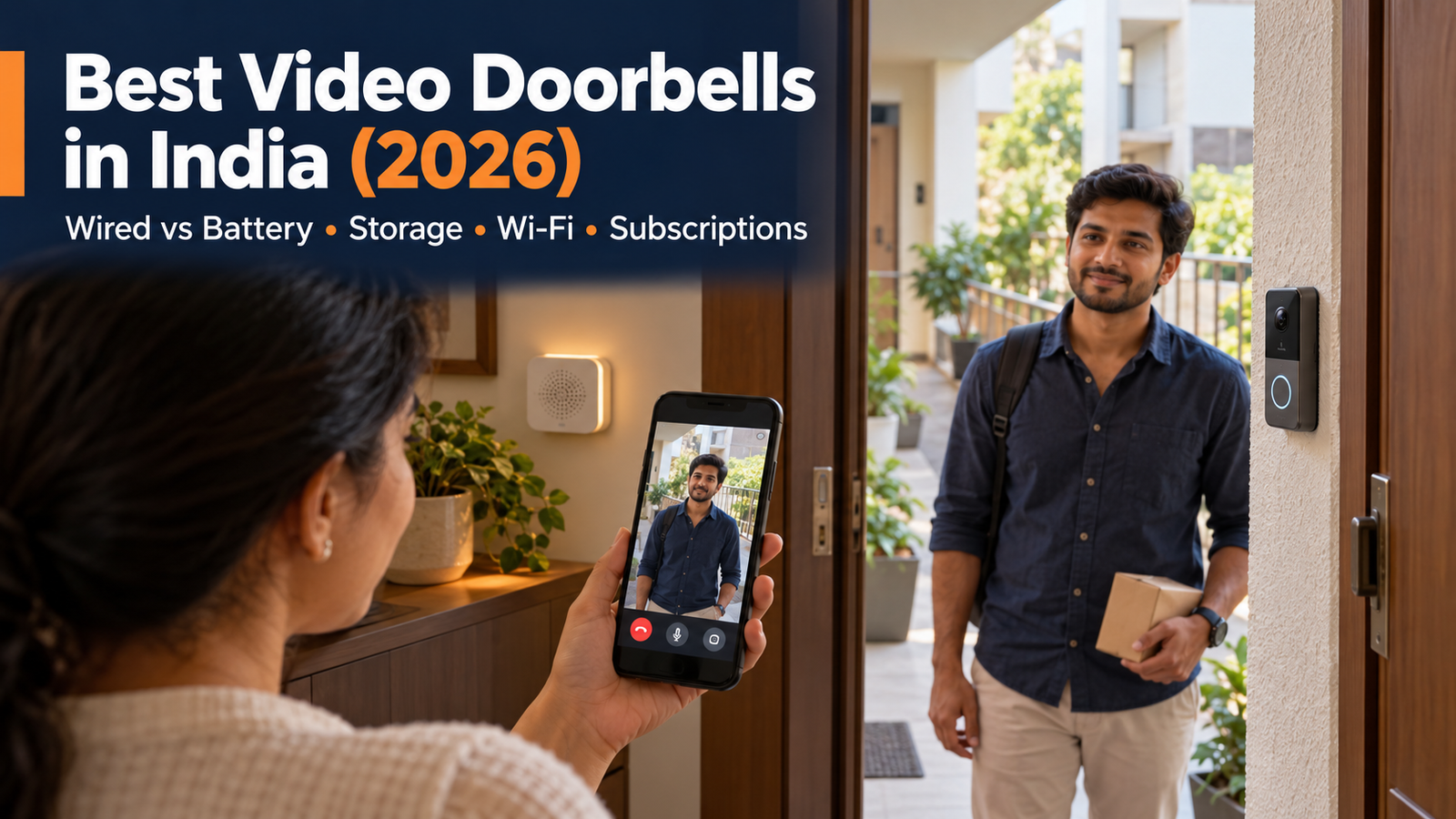
A video doorbell lets you see a visitor before opening the door. But the best video doorbell in India for your home depends on more than the camera’s pixel count: power at the entrance, Wi-Fi through concrete walls, a useful view of visitors and packages, indoor ringing, storage, recurring charges and permission to mount a camera all matter. This guide compares manufacturer documentation with India-market listings and explains the compromises. It does not claim hands-on testing.
Quick Answer: The Tapo D230S1 is the strongest current battery-doorbell recommendation with a verifiable India retailer listing: it combines a removable battery, included H200 chime/hub, indoor microSD recording and documented detection features. The D235 has appealing specifications but lacks a verified current Indian purchase path, so do not lead with it. For existing 5 V power and direct India sales, consider Qubo Video Doorbell Pro 2K. The Tapo D225 bundles a Wi-Fi chime with indoor card storage. An approved peephole may make EZVIZ DP2C useful in a flat. CP PLUS CP-L23 is a lower-cost, narrower-view alternative. None fits every entrance.
Best Video Doorbell in India: Quick Answer
| Need | Candidate | Decisive qualification |
|---|---|---|
| Best overall available battery kit | Tapo D230S1 | Confirm seller, kit contents, delivery to your PIN code and warranty before ordering. |
| Best local storage in an indoor hub | Tapo D230S1 | Included H200 holds the card; the hub needs power and a network connection. |
| India-direct wired option | Qubo Video Doorbell Pro 2K | Needs continuous 5 V/2 A power; cloud and some premium options cost extra. |
| Battery kit with Wi-Fi chime | Tapo D225 | Chime holds the microSD card; confirm an authorised India seller. |
| Existing peephole and indoor screen | EZVIZ DP2C | Check door-hole dimensions, permissions, stock and seller support. |
| Lower initial price | CP PLUS CP-L23 | Narrower 120° view and less clear subscription documentation. |
Best Video Doorbells in India at a Glance
For the best video doorbells in India, compare the entrance and ownership model before the nominal resolution. FOV values below are not directly comparable where one maker reports diagonal, and another does not identify the axis.
| Model | Power | Video / stated FOV | Network | Event storage | Indoor alert | Weather | Observed India price /availability |
|---|---|---|---|---|---|---|---|
| Tapo D230S1 | Removable 6,700 mAh battery; powered H200 | 2560×1920; 166° diagonal | Doorbell 2.4 GHz plus local sub-1G hub link; hub Ethernet | H200 microSD ≤512 GB; optional Tapo Care | H200 hub | IP64 | Flipkart ₹16,999 at checkout; PIN code price/stock may vary |
| Qubo Pro 2K | 5 V/2 A AC adapter | 1296p, 3 MP; 140° (axis unspecified) | 2.4/5 GHz Wi-Fi | Doorbell microSD ≤1 TB; paid cloud optional | AC-powered wireless chime support; confirm bundle | IP66 | ₹8,990 on Qubo India |
| Tapo D225 | Built-in rechargeable 10000 mAh battery or compatible hardwire | 2K 4 MP; 170.6° horizontal, 140.1° vertical | 2.4 GHz | Doorbell microSD up to 512 GB; optional cloud | Optional Tapo Care | IP66 | India product page; current India price not established |
| EZVIZ DP2C | Rechargeable 4,600 mAh battery | 1080p; 155° diagonal | 2.4 GHz Wi-Fi | Indoor unit microSD ≤512 GB; optional CloudPlay | Built-in ringtone and 4.3-inch screen | IP rating not clearly specified by manufacturer | Specialist India listing ₹24,999, limited stock shown |
| CP PLUS CP-L23 | Two 2,500 mAh cells; manufacturer also specifies 8–24 V AC or 5 V DC input | 2 MP; 120° (axis unspecified) | Wi-Fi band not clearly specified by the manufacturer | Doorbell microSD ≤128 GB; cloud terms unclear | USB chime listed | IP65, IK07 | ₹8,600 on Flipkart, limited stock shown |
How EasyFixGear Researched These Video Doorbells
We screened 16 identifiable candidates: Tapo D230S1, D225 and TD25; Qubo Pro 2K, Ultra and InstaView; EZVIZ DB2 Pro, DB2, DB2C, EP3x, HP4, DP2C and HP7; CP PLUS CP-L23; and Godrej SeeThru Contactless. Similarly, we also checked Ring, Nest, Xiaomi and Imou at the brand/market level. We compared India availability, exact model documents, power, installation, field of view, detection, storage and subscription, Wi-Fi, weather rating, support, privacy features and three-year cost. We consolidated closely overlapping models and excluded video intercom kits with a different installation purpose. Ring and Nest were not elevated on brand recognition without a convincing current India support and subscription case. Imou DB60 appears marked as end-of-life in an official regional catalogue. Some excluded products may suit a specific professional installation, but their evidence did not justify a general consumer recommendation.
How we researched: This guide is based primarily on manufacturer specifications, manuals, support documentation, platform information and current India-market availability. We do not describe a product as hands-on tested unless that testing has actually been performed. Seller prices and stock are snapshots. Unknown model-specific behaviour is marked rather than inferred.
1. Tapo D230S1 — best currently purchasable battery kit with indoor storage
Best for: A battery-first entrance with a powered indoor hub. Typical price: Flipkart showed ₹16,999 on 28 September 2026; confirm your PIN code price and stock. Amazon availability could not be reliably verified. Power: Removable, rechargeable 6,700 mAh battery; separate H200 hub needs its own adapter. Video/FOV: 2560×1920, 4:3; 166° diagonal, 135° horizontal, 102.8° vertical. Wi-Fi: 2.4 GHz with a sub-1G link to the H200; hub Ethernet. Storage: H200 microSD up to 512 GB or Tapo Care. Subscription: Optional for locally recorded clips; cloud and notification snapshots are paid. Chime: Included with H200. Smart home: Alexa and Google Assistant listed. Weather: IP64. Warranty: Check India invoice terms. Official India page.
What it solves.
Storing a card indoors reduces the risk that removing the outdoor unit removes the card too. The kit includes the H200 rather than requiring a separate hub purchase, and TP-Link documents person, pet, vehicle and package detection, two-way audio, motion zones and IR- or spotlight-assisted colour night view. Standard notifications and card recording are available without Tapo Care; snapshot notifications and cloud history are paid. The company’s 180-day claim is based on controlled event counts; its examples show a shorter month-long figure at 60 short clips per day. Battery and specification details.
Installation, privacy and limits
The doorbell, H200 and router must be placed for their respective links. Keeping the hub and card indoors is useful, but the hub’s power and app/account still matter; it does not prove fully offline operation. Use separate family access where available, change the account password and keep firmware updated. Buy if you prefer a removable battery and indoor card. Skip if you lack a place to power and connect the H200, want continuous wired recording, or need the wider D235 vertical view. Assessment: the best current lead recommendation for readers who accept battery upkeep and an indoor hub, based on manufacturer documentation and a live India retailer listing. Check current India price and availability.

- 2K 5MP Live View—— Always know what happens in front of your door through the Tapo app. With the starlight sensor and 2K…
- Color Night Vision—— With the embedded spotlight and starlight sensor, Tapo D230S1 reveals high-fidelity details and col…
- Head-to-Toe View—— With the camera’s ultra-wide FOV(160° Diagonal), Tapo 4:3 live view ensures users can check visitors …
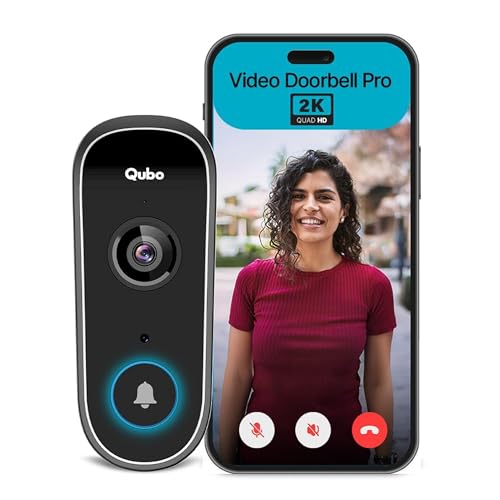
2. Qubo Smart Wi-Fi Video Doorbell Pro 2K — India-direct powered option
Best for: A home that can supply continuous, correctly installed 5 V/2 A power near the door. Typical price: ₹8,990 on Qubo India. Power: AC adapter, 5 V/2 A; this is not a rechargeable battery doorbell. Video/FOV: 3 MP, 1296p; 140°, axis not clearly specified. Wi-Fi: 2.4 and 5 GHz. Storage: On-device microSDXC up to 1 TB, optional paid cloud. Subscription: Optional for local storage; paid cloud and higher access tiers. Chime: Wireless AC-powered chime supported; verify box contents. Smart home: Qubo locks/Home Tab documented; exact Alexa/Google functions not clearly specified on this product page. Weather: IP66. Warranty: Qubo lists one year and advertises installation support, subject to service location. Qubo India listing.
What it solves
This is the clearest direct India purchase among the powered Wi-Fi candidates. The maker lists visitor video calls, two-way talk, person alerts, zone controls and optional continuous recording. Continuous recording needs an appropriate card, power and settings; do not infer that every event reaches the cloud. The product page says two users by default and up to five under Premium. Qubo’s separate AI Guard page lists plans, but does not clearly establish how each camera-plan feature maps to this exact doorbell. Ask Qubo for the doorbell-specific free/paid feature matrix and plan price before purchase. Product: AI Guard.
Installation, privacy and limits
Plan a safe power route and a socket/adapter that remains powered through normal use; use qualified assistance for fixed wiring. Its Indian server storage claim concerns the service described by Qubo, not a guarantee that all data remain local or that cloud access is unnecessary. On-device microSD is vulnerable to device removal. A 140° unqualified FOV cannot be compared cleanly with a diagonal 176° figure. Buy if fixed low-voltage power and direct India service are priorities. Skip if you need a battery doorbell or independently verified free cloud history. Assessment: a credible India-supported wired-power choice with a subscription clarification to resolve.
- 【Wireless Smart Entrance Architecture】 Seamless integration between Video Doorbell Pro and Smart Door Lock. No inter-dev…
- 【Live Two-Way Communication + Remote Unlock】 Built-in mic & speaker enable live conversation with visitors. Remote unloc…
- 【Multiple Ways to Unlock】 Fingerprint, Passcode, App Unlock, Access Card, OTP, Mechanical Key. Flexible and redundant ac…
3. Tapo D225 — flexible battery or wired power
Best for: A home that needs battery installation now but may later add compatible low-voltage wiring.
Typical India price: Not reliably established as of 29 September 2026. Power: Built-in rechargeable 10,000 mAh battery or compatible hardwired power. Video and view: 2K QHD, 4 MP, field of view is 170.6° horizontal and 140.1° vertical. Wi-Fi: 2.4 GHz only. Storage: microSD card up to 512 GB; card sold separately. Subscription: Not required for local card recording. Chime: An indoor chime is included in TP-Link’s documented US kit; confirm the contents of the exact Indian offer. Smart home: Alexa and Google Assistant viewing on supported devices; do not assume every app feature works inside those platforms. Weather rating: IP66 in TP-Link’s product documentation. India warranty: Not clearly established for a D225 bought from a particular seller. Confirm eligibility with TP-Link India before purchase.
Why it stands out
The D225 solves a specific installation problem: it can start as a rechargeable doorbell and use suitable wiring later. Its broad, relatively tall view can help frame a visitor and a parcel near the threshold. Its 4 MP label alone does not establish better real-world image quality than another model. The doorbell also offers two-way talk, a phone ring-call feature, adjustable motion zones and a removal alarm. TP-Link says its activity zones apply to motion detection; do not describe them as separate zones for every AI category.
What is free, and what costs extra?
With a compatible microSD card, buyers can use local recording without a Tapo Care subscription; TP-Link lists on-device detection for people, pets, vehicles and packages without a monthly fee. Tapo Care adds cloud storage and snapshot notifications. The card sits inside the outdoor doorbell, so removal or damage to the unit can also put locally stored footage at risk. Local storage does not guarantee that all app features work without internet. Verify the current India plan and price in the Tapo app before quoting a three-year subscription cost.
Installation trade-off
Battery operation avoids arranging doorbell wiring but requires periodic charging. Compatible hardwiring can enable Always-On mode, continuous recording and up to four seconds of pre-roll. That mode requires bypassing an existing conventional chime; an existing mechanical chime may remain usable only in a different wired configuration with Always-On disabled. Have a qualified installer check the transformer and chime circuit rather than connecting the unit to mains power. TP-Link specifies an 8–24 V AC, 10–40 VA supply in its support guidance.
Who should buy it? Someone with a dependable 2.4 GHz signal at the entrance who values battery/wired flexibility, a broad doorstep view and local recording, provided the seller and warranty check out.

- Dual Power Option – 10000mAH Built-in Battery powered or 8-24V hardwired powered. Pre-roll feature support when hardwire…
- 180° Ultra-wide head-to-toe view – Experience the full picture with our 180° ultra-wide field of view, capturing every d…
- Immediate Response with Ring Call: When someone rings the doorbell, it initiates a call to your smartphone, allowing for…
4. EZVIZ DP2C — existing peephole with indoor screen
Best for: A flat whose approved door already has a compatible peephole. Typical price: ₹24,999 at a specialist Indian listing with limited stock shown; compare quotes. Power: Rechargeable 4,600 mAh battery. Video/FOV: 1080p, 155° diagonal. Wi-Fi: 2.4 GHz. Storage: Indoor microSD up to 512 GB or paid CloudPlay. Subscription: Cloud history optional; local card recording available. Chime: Built-in electronic ringtone and 4.3-inch screen. Smart home: Alexa/Google support not clearly specified by the manufacturer. Weather: IP rating not clearly specified by the manufacturer. Warranty: Confirm in writing with seller. EZVIZ specifications; India listing.
What it solves
Someone at home can see the person outside on the indoor screen without unlocking a phone. EZVIZ lists PIR detection, two-way calling, IR night view and event storage. It explicitly says face detection is not supported. Free local card storage differs from the paid CloudPlay remote history; neither establishes how every app function behaves during an internet outage. The indoor viewer/card makes this an apartment-specific alternative, not a cheaper general-purpose doorbell. Technical sheet.
Installation and limits
The manufacturer specifies a 16.5–50 mm peephole and 35–105 mm door thickness; measure before ordering. Obtain permission before replacing a door viewer, especially in a rental or managed building. Do not drill a new fire-rated/common-area door without approval. Price is high, stock is limited, and weather protection is not documented at an IP level. Buy if the existing hole fits and an indoor screen is valuable. Skip if it requires an unapproved door alteration or a fully exposed gate installation. Assessment: a conditional niche pick; the right installation matters more than its ranking.
5. CP PLUS CP-L23 — lower upfront cost with clear compromises
Best for: A price-sensitive buyer who confirms current stock and support. Typical price: ₹3,600 at one specialist Indian dealer, only one unit shown. Power: Two 2,500 mAh batteries; CP PLUS lists 8–24 V AC or 5 V/2 A DC options, subject to the manual. Video/FOV: 2 MP Full HD; 120° view, axis unspecified. Wi-Fi: Band not clearly specified by the manufacturer. Storage: microSD up to 128 GB; exact cloud price/free history not clearly specified by the manufacturer. Subscription: Confirm app terms before buying. Chime: USB-powered chime listed. Smart home: Manufacturer lists Alexa and Google Assistant; functions not itemised. Weather: IP65, IK07. Warranty: Check invoice and CP PLUS support; a retailer advertises 24 months, which should not be assumed across sellers. Manufacturer page; India dealer price.
What it solves
It combines a doorbell, IR night view, two-way talk, PIR alerts, card slot and indoor USB chime at a much lower observed purchase price. A local card can avoid paying solely to retain events, but check whether the current ezykam+ app adds any conditions. Do not convert a retailer’s phrase about human movement into confirmed AI person classification. CP PLUS specification & Latest Price in India.
Installation, privacy and limits
The narrower view may omit the threshold at a poor angle; test placement before fixing. Battery duration and exact cloud entitlement are not clearly specified. Confirm whether this specific older model still receives firmware updates and whether accessories remain available. Buy if price dominates and the view, app terms and warranty are acceptable. Skip if package visibility, transparent cloud costs or long documented support are essential. Assessment: a defensible budget candidate, not a universal bargain.
Battery vs Wired Video Doorbell: Which Is Better?
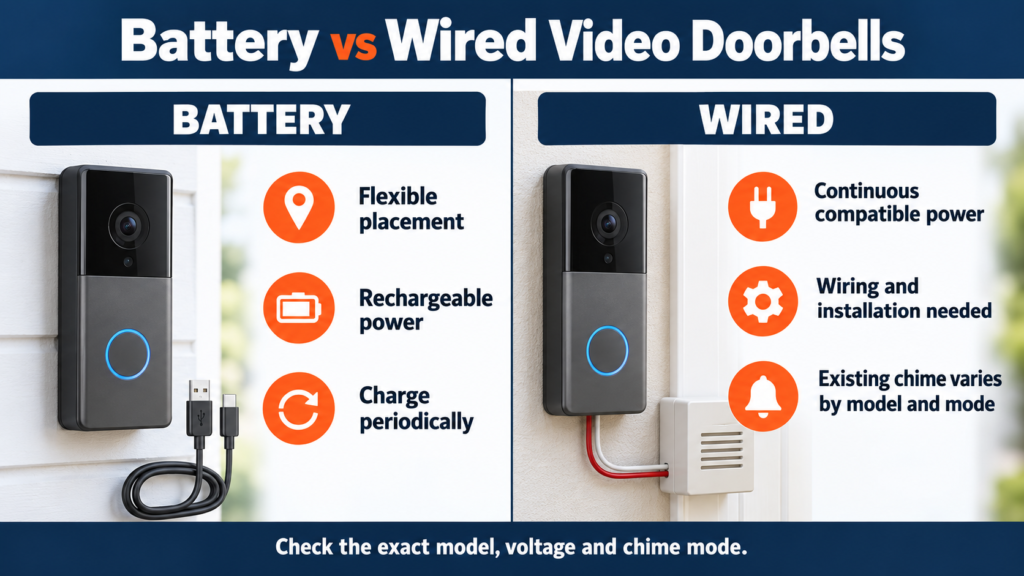
| Question | Rechargeable battery | Supported wired power |
|---|---|---|
| Installation | Usually fewer power alterations; mounting permission still required | Confirm voltage, transformer, route and qualified installation |
| Upkeep | Recharge regularly; heavy traffic can shorten claimed life | No routine charging if power is stable |
| Recording | Often motion-triggered to save power | Certain models permit continuous recording in specified modes |
| Power cut | Doorbell can remain on until battery empties | Stops unless its supply is backed up |
| Chime | Check included indoor chime and its own power | Existing chime compatibility varies, sometimes by operating mode |
| Rental | Potentially easier to remove with approved mounting | May involve prohibited alteration |
| Position | Flexible only within reliable network range | Limited by safe power routing |
“Wireless” can mean Wi-Fi networking while the doorbell still needs a power cable. “Wired” can mean low-voltage power while video still travels over Wi-Fi. A typical Indian mains doorbell circuit should not be assumed compatible with a model marked 8–24 V; ask a qualified installer to identify the actual supply.
Resolution Isn’t Everything: What Makes Doorbell Video Useful?
Resolution sets a pixel ceiling, not the detail you will actually recognise. A sunlit gate with a shaded face tests dynamic range; compressed video, motion blur, a weak upload connection and a dirty lens can erase the apparent gain from 2K. Check manufacturer WDR/HDR claims, IR versus spotlight-assisted colour night modes, and whether a person standing close to the door remains in frame. Verify example footage from the exact model where possible, without treating promotional samples as independent testing. Mounting angle and a wedge can matter more than an extra megapixel.
Field of View: Can You See the Visitor and the Package?
Horizontal FOV covers side-to-side approaches; vertical FOV covers face-to-threshold; diagonal spans corner-to-corner and is often the largest advertised number. A 176° diagonal lens cannot simply be ranked above a 140° horizontal one. Portrait or 4:3 framing often allocates more picture height than a wide 16:9 view, but the lens position and visitor distance still decide if a parcel appears. In a tight corridor, avoid capturing neighbours’ doors simply to maximise the viewing angle. For a gate, first determine whether you want to see the caller at the gate or an approach area; those are different camera placements.
Local Storage vs Cloud Storage
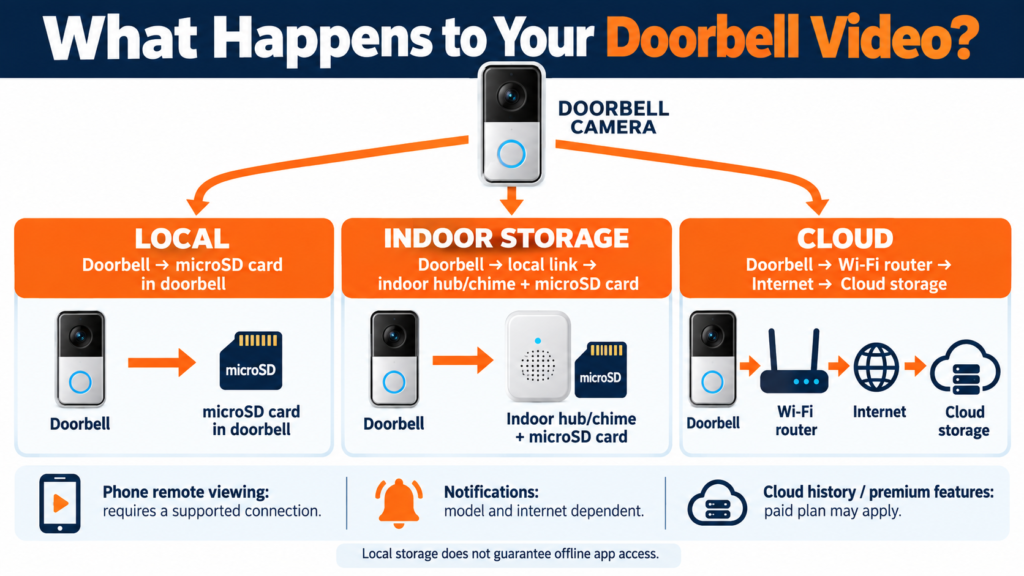
| Method | Benefit | Cost and failure mode |
|---|---|---|
| Card in exposed doorbell | No recurring storage plan; simple | Card may leave with stolen/damaged device; card wears out |
| Card in indoor hub/chime/viewer | Recording medium stays inside | Hub needs power and connectivity; storage capacity is finite |
| Paid cloud event clips | Remote event history may remain after device theft | Recurring fee, internet upload, account and provider dependence |
Local storage does not prove that setup, notifications, remote playback or the app work without cloud services. Cloud storage does not prove constant recording. Check event duration, retention, download/export, encryption, deletion and what happens when a plan expires. Use a card of a supported type and endurance rating; replace a failing card promptly.
Do You Need a Subscription for a Video Doorbell?
Separate live view, button press alerts, motion/person/package classification, recording, searchable history, notification snapshots and cloud backup. The last four are often mixed in sales copy. Below, “free” means no recurring cloud fee, not a free card, data connection or app account.
| Product | Works without paid plan? | Documented no-plan path | Paid or unresolved |
|---|---|---|---|
| Tapo D230S1 | Yes | Live view, standard alerts, listed AI detection, card included in H200 | Tapo Care cloud history and snapshot notifications |
| Qubo Pro 2K | Yes for local card route | Live view, card storage and two default users on published page | Paid cloud and up to five users on Premium; precise doorbell plan entitlements need confirmation |
| Tapo D225 | Yes, with a separately purchased microSD card for local recording | Live view, listed on-device detection, standard notifications and local recording | Tapo Care cloud storage and snapshot notifications |
| EZVIZ DP2C | Yes with card | Indoor live screen/ring and microSD route | CloudPlay event history; India price in app |
| CP PLUS CP-L23 | Card route documented | Live view, PIR alerts and ≤128 GB card capability | Exact cloud/free app terms not clearly specified by manufacturer |
Subscription-price disclaimer: Figures seen on generic global CloudPlay or AI Guard pages may differ by country, app channel, number of cameras and exact doorbell eligibility. We could not establish a defensible current India price for every shortlisted model; inspect the device-specific plan page in the app before paying. A free trial is temporary, and “no subscription required” never means every feature is included.
2.4 GHz vs 5 GHz Wi-Fi for Video Doorbells
Check the actual signal at the proposed mounting point, with the door shut and at busy hours. Concrete, brick and metal gates can sharply change reception. D230S1, DB2 Pro and DP2C specify 2.4 GHz; Qubo Pro lists both bands; CP-L23’s band is not clearly specified in its cited manufacturer material. 2.4 GHz often reaches further through obstacles; 5 GHz may offer more bandwidth but often has shorter practical reach. A phone on 5 GHz can still communicate through the same permitted LAN with a 2.4 GHz device. A guest network with isolation may disrupt discovery. EasyFixGear’s dedicated 2.4 GHz versus 5 GHz guide can be linked here once its live URL is verified.
Do Video Doorbells Work Without Internet?
Power, local Wi-Fi, internet and a manufacturer’s cloud are distinct. With power and a working router but no ISP service, an on-device or indoor card may keep recording events, depending on how the exact camera/hub implements triggers and its clock. A phone’s remote live view, off-site alert and cloud upload generally require the relevant internet services. A card in a powered hub helps retain footage only if the doorbell can still send video to it. If Wi-Fi itself fails, even a powered camera may lose the path to indoor storage. These six products do not publish a consistent, complete offline feature matrix; verify rather than promise offline operation. The smart-plug outage guide explains the network layers, but a plug’s fallback behaviour cannot be transferred to a camera.
What Happens During a Power Cut?
A battery doorbell can stay powered while its charged battery lasts. A wired-only Qubo installation needs backed-up doorbell power; a charged D230S1 doorbell can remain powered while its H200 still needs power. The router, ISP equipment, H200/chime, indoor screen and any local storage path each have their own power needs. A router on an inverter or UPS can help only if the relevant network, hub and upstream link remain available. Never promise remote notifications merely because the camera battery is charged. After supply returns, check the timestamp, Wi-Fi reconnection, saved clips and chime.
Do You Need a Separate Indoor Chime?
Phone alerts can be muted, delayed or missed by visitors’ carers at home. D230S1’s H200, D225’s Wi-Fi chime, DP2C’s indoor unit and CP-L23’s USB chime each offer a household alert path, but the chime itself needs power or a charged indoor unit. Qubo supports an AC-powered wireless chime; confirm whether your particular offer includes it. Existing mechanical chime compatibility is a separate question from a supplied electronic chime. Speaker announcements through Alexa/Google are model and mode dependent; a “Works with” logo alone does not establish two-way talk or full live-view parity.
Best Video-Doorbell Setup for an Apartment or Flat
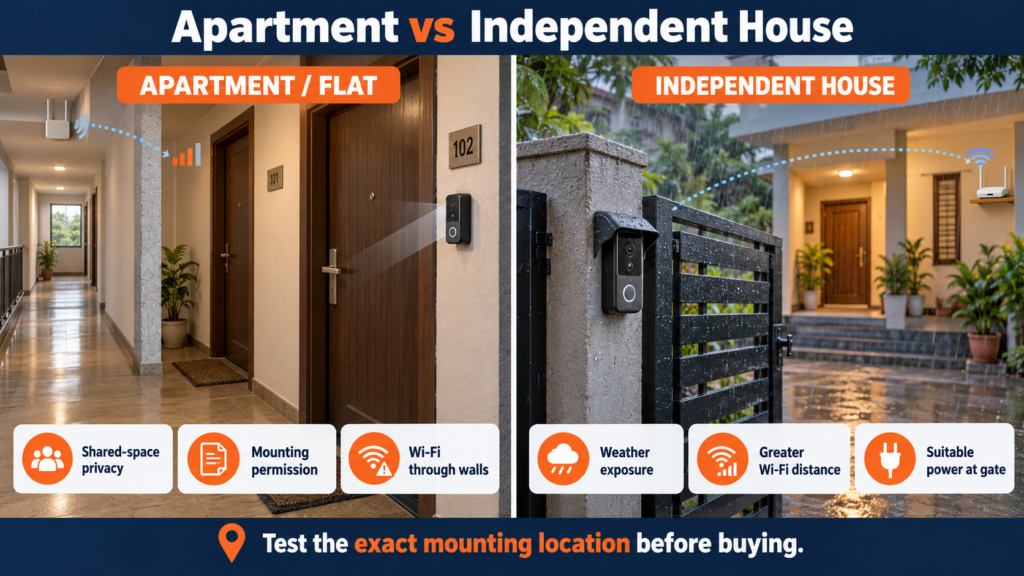
Measure corridor width and the distance to a standing visitor. A deep wide lens can capture neighbours’ doors; aim it at your own threshold and use privacy/motion zones where supported. Check society rules, landlord permission, corridor electrical access and whether adhesive mounting is expressly approved by the manufacturer for the surface. The D230S1 kit offers battery placement; DP2C is an option only with a compatible, approved door peephole. Concrete between router and entrance can make a nominally suitable model unusable. In a shared area, take particular care with audio capture, retention and who in the household can access recordings. Ask about tamper-resistant mounting without treating an alarm as theft prevention.
Video Doorbells for Independent Houses
A sheltered front door and a distant exposed metal gate are different network and weather problems. At the gate, test the signal with the gate closed, check for safe power, rain splash, dust and heat, and consider the distance to a caller’s face at night. A separate properly installed gate intercom or camera system may suit a long driveway better than a doorbell mounted too far from the home router. At the main door, frame the approach and parcel drop spot without filming unnecessary public space. Verify mounting height against the manufacturer’s guide and test clips before permanently fixing the bracket.
Can Renters Install a Video Doorbell?
Ask before drilling a wall or changing the door viewer or bell wiring. A battery device does not make a mounting location automatically permitted. Some manufacturers list adhesive options, but use only an approved mount on the specified surface and account for tampering and rain; do not improvise a weak attachment. Keep the original peephole or bell components if an authorised reversible change is made. If permissions cannot be obtained, a conventional doorbell or approved indoor viewer may be the better answer.
IP Ratings and Indian Weather
An IP code describes tested resistance to solid ingress and water under specified conditions; it does not make a unit “waterproof” in every monsoon installation. Listed doorbell ratings: D230S1 IP64, Qubo Pro IP66, D225 IP66, CP-L23 IP65; DP2C’s IP rating is not clearly specified. Check each product’s operating temperature as well as rain rating, especially on a sun-exposed gate. Mounting, seals, cable entry, and a sheltered position still matter. An exposed peephole viewer should not inherit the weather rating of another EZVIZ model.
Video-Doorbell Privacy: What Should You Consider?
Before enabling recording, stand at the door and inspect precisely which neighbour’s door, corridor, street or delivery area enters the frame. Narrow the camera angle or configure available privacy masks and motion zones; a motion zone can reduce alerts without necessarily masking what is recorded. Decide whether audio is necessary, who has access and how long recordings remain. Use a strong, unique account password, enable multifactor authentication if the app offers it, review shared users and app permissions, update firmware, and delete footage you no longer need. Local card storage reduces one type of cloud-retention exposure but creates physical theft and device failure risks. Check the maker’s security and support lifecycle. Consider society rules, neighbour expectations and applicable local requirements rather than assuming common-area recording is always permitted.
Alexa, Google Home and Smart Displays
Compatibility may mean voice commands, ring announcements, a live stream, or some combination. It does not guarantee two-way audio through a display, playback of local clips, package detection or operation during a cloud outage. TP-Link lists Alexa/Google for D230S1; CP PLUS lists both for CP-L23. The exact Qubo and EZVIZ functions for these particular models are not fully itemised in the cited India product documentation. Confirm the model, regional skill, display model and account linking before basing a purchase on a voice feature. A dedicated indoor chime is often simpler for a mixed household.
Video-Doorbell Installation Checklist
- Confirm permission, the mounting surface and any shared-area camera rules.
- Mark the visitor’s standing point and package location; check a test view by day and night.
- Test Wi-Fi at the chosen spot with the door/gate closed.
- Match the exact model’s power input or existing low-voltage transformer. Use qualified help for fixed electrical work; never connect a low-voltage doorbell directly to mains.
- Check the included or optional chime, its power and compatibility with the existing chime mode.
- Verify rain exposure, temperature, bracket and appropriate supported mounting method.
- Add a supported endurance microSD card or review the correct cloud plan and retention.
- Set motion sensitivity, recording area, privacy masks, audio choice and household permissions.
- Apply firmware updates and secure the account.
- Test visitor press, indoor ring, phone alert, two-way talk, saved playback and reconnect after router/power restart.
The Purchase Price Isn’t the Whole Cost
Use this three-year ownership equation: purchase price + 36 months of chosen subscription (or three annual plans) + suitable microSD card + any separately sold chime + approved mount/wedge + installation + any replacement battery/accessories. Do not count an included H200 or chime twice. Compare equivalent retention and alert requirements, not simply device prices.
For example, the published Qubo price of ₹8,990 versus a dealer’s ₹3,600 CP-L23 quote is a ₹5,390 purchase gap, before cards, chimes, installation and plans. That arithmetic does not establish CP-L23 as better value: cloud entitlement, field of view, and support differ. As a purely illustrative subscription sensitivity, ₹149 a month × 36 = ₹5,364, and ₹1,490 a year × 3 = ₹4,470. Qubo displays those figures on a broader AI Guard plan page, but eligibility and exact feature mapping for the Pro 2K doorbell are not established here; do not add them as the device’s quoted cost. Get its specific plan screen first. The same rule applies to Tapo Care and EZVIZ CloudPlay India pricing. Qubo price; plan page; CP dealer quote.
How to Choose the Best Video Doorbell for Your Home
- Home type: Flat corridor or independent house/gate? Confirm permission first.
- Power: Can you charge periodically, or is compatible low-voltage power available?
- Position: Can the camera see the visitor and threshold without unnecessary shared space?
- Network: Is Wi-Fi reliable at that exact point, not just inside the living room?
- Coverage: Compare vertical/horizontal view and approach distance, not diagonal numbers alone.
- Storage: Card in doorbell, card indoors or cloud? What happens if the device is removed?
- Plan: Which precise features are free, and what is the cost of the desired plan for three years?
- Chime: Must somebody indoors hear a ring without a phone?
- Ecosystem: Verify your exact Alexa/Google display functions.
- Weather: Match published ingress and heat limits to your site.
- Privacy: Can you frame your entrance respectfully and manage user access?
- Support: Is this exact model sold with an Indian warranty, parts and firmware support?
- Budget: Include installation, storage, accessories and likely charging effort.
For a wider beginner roadmap, see Best Smart Home Devices in India and Smart Home on a Budget in India. A smart plug buying guide is useful for other devices, but do not use a consumer smart plug as a substitute for correct fixed doorbell wiring.
Common Video-Doorbell Buying Mistakes
Choosing solely by resolution or an incomparable diagonal FOV; forgetting to frame a parcel; assuming “wireless” avoids charging or “wired” provides Ethernet; measuring Wi-Fi at the router instead of the door; equating a microSD slot with guaranteed offline operation; overlooking card and subscription costs; forgetting an indoor chime; assuming every Alexa/Google logo means identical features; buying before checking society permission, rain exposure or power voltage; mounting at a convenient but unusable angle; buying a cheap unsupported import without India warranty or spare accessories; leaving shared accounts and privacy settings unattended; and assuming camera software will be supported indefinitely. A video doorbell helps you see, speak to, and sometimes review visitors; it does not physically prevent entry or replace a complete home-security plan.
When a Video Doorbell May Not Be the Right Solution
If doorway Wi-Fi is unreliable and cannot be improved, connected alerts will frustrate you. Similarly, if charging is impractical and no safe compatible power can be arranged, wait. In the same way, if the camera necessarily films a prohibited shared corridor, do not force the installation. If existing CCTV already gives the needed view, an ordinary audible bell may suffice. If you only want to hear visitors, a conventional bell is simpler and has no recording/subscription burden. A purpose-built gate intercom can suit a distant entrance better. This no-purchase decision can be the best value.
Which Video Doorbell Should You Buy?
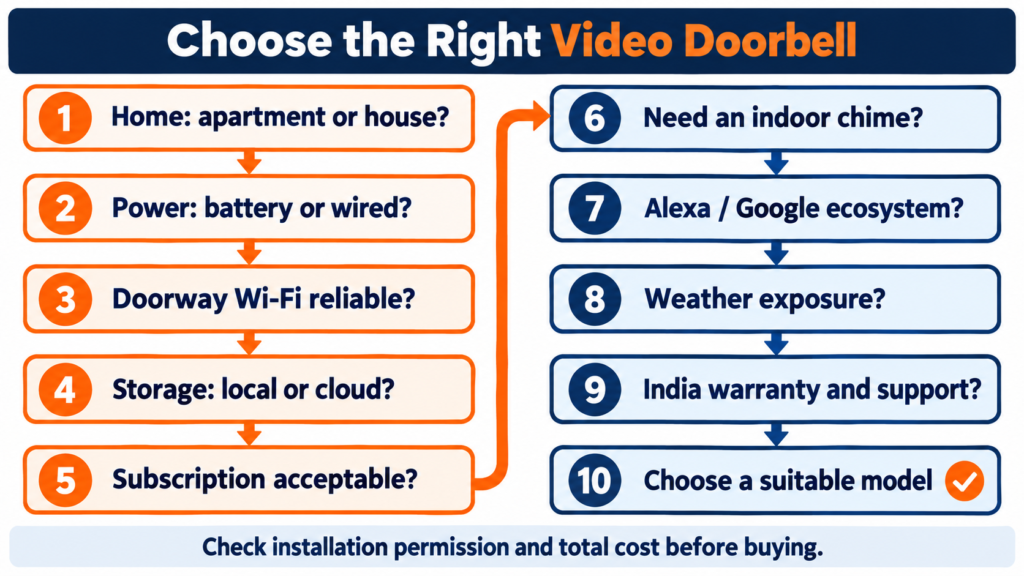
Start with home type → permitted placement → power → doorway Wi-Fi → storage → subscription → vertical view → chime/ecosystem → India support → three-year budget. If these checks pass, D230S1 is the strongest currently verifiable battery-kit purchase and keeps its card in the H200; Qubo Pro offers a direct India 5 V powered option; DB2 Pro combines battery, chime and indoor card; DP2C is for a compatible approved peephole; CP-L23 trades documentation and view breadth for a low observed price. The best video doorbell in India is the one whose installation and free/paid behaviour you can verify for your entrance. No model above is a complete security system.
Frequently Asked Questions
1. Which is the best video doorbell in India?
Tapo D230S1 is the most practical current battery-kit lead here because its India retail listing is visible and its manufacturer documents the included H200, removable battery and indoor card storage. Another model may be better for a peephole, fixed power or direct manufacturer purchase.
2. Do video doorbells need Wi-Fi?
These app-connected models use Wi-Fi or a hub link plus network access for their smart functions. A conventional bell or some dedicated video intercoms may use different wiring.
3. Do video doorbells work without internet?
Some local recording or indoor functions may continue while powered, but remote viewing, cloud upload and off-site alerts usually depend on internet services. Verify the exact model and hub path.
4. Can a video doorbell work without a subscription?
Yes, if its supported card/hub route covers your event history needs. Cards cost extra, and premium cloud clips or notification features can remain paid.
5. Which is better: wired or battery?
Battery eases placement but requires charging. Properly wired power reduces charging and may unlock recording modes, but needs compatible voltage and permitted installation.
6. Can I install one in an apartment?
Possibly, subject to housing-society and landlord rules, privacy of shared spaces, network signal and an approved mount. An existing peephole is a separate conditional route.
7. Do they record all the time?
Many battery configurations record events. The shortlisted battery models do not establish continuous recording in their normal battery modes; do not assume they record all the time.
8. Will one work during a power cut?
A charged battery camera may stay on, while the router, hub, chime or ISP equipment may lose power. Remote alerts require the complete relevant path.
9. Is local storage better than cloud?
It avoids a recurring recording plan but can be lost or damaged; an indoor hub reduces outdoor card exposure. Cloud can preserve uploaded clips after theft but adds fees and internet/account dependencies.
10. Do I need an indoor chime?
Not always, but it is useful when family members might miss phone alerts. Check whether it is bundled, needs power and works in the mode you intend to use.
Manufacturer and market sources
- TP-Link India D230S1 and Flipkart listing: model specifications and a current India offer. D235 is on availability hold.
- Qubo India Pro 2K and AI Guard plan page: direct price, technical details and broader plan context; doorbell-specific entitlement must still be checked.
- EZVIZ India DB2 Pro, DP2C specifications and CloudPlay: kit, mounting dimensions, card storage and region-dependent subscriptions.
- CP PLUS CP-L23, dealer quote and Croma listing: manufacturer specification, stock/price and seller support details. Retailer claims are not a substitute for manufacturer technical claims.