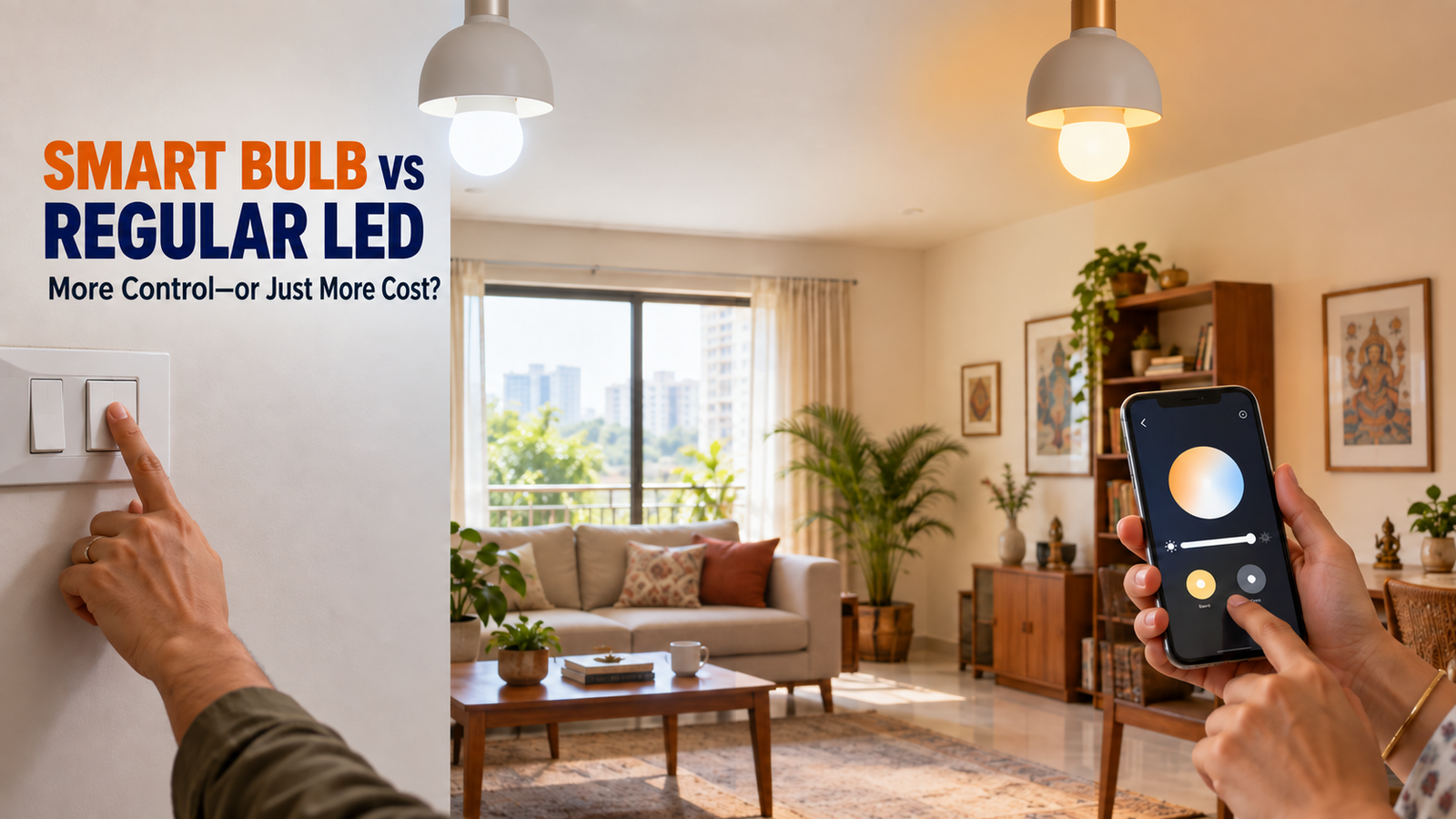
A regular LED bulb already gives efficient, inexpensive light. A smart bulb adds schedules, app and voice control, dimming, adjustable white and sometimes RGB colour, but it costs more, uses standby power and introduces software dependencies. The useful smart bulb vs regular bulb question is therefore: Will you use those features often enough to justify the extra cost and complexity?
Quick Answer
Smart bulbs are worth it where schedules, remote control, dimming, adjustable white light or colour solve a recurring problem. They are not automatically more energy-efficient than regular LEDs. For most households, the best-value arrangement is mostly regular LED bulbs plus a few strategically placed smart lights.
Smart Bulb vs Regular Bulb: Quick Verdict
| Priority | Better fit | Why |
|---|---|---|
| Lowest purchase cost | Regular LED | Costs far less. |
| Simple on/off lighting | Regular LED | No app, account or setup. |
| Schedules and routines | Smart bulb | Automates on/off and brightness. |
| Remote control | Smart bulb | Supported models work while powered and online. |
| Voice control | Smart bulb | Check exact Alexa, Google or Apple compatibility. |
| Colour and adjustable white | Smart bulb | RGB/RGBW and tunable-white models offer flexible ambience. |
| No app/account | Regular LED | Works from the wall switch. |
| Lowest complexity | Regular LED | No reconnection or platform issues. |
| Smart-home integration | Smart bulb | Joins scenes, sensors and routines. |
| Rental automation | Smart bulb | Adds control without rewiring. |
| Long-term simplicity | Regular LED | No platform dependency. |
Choose a smart bulb for repeated automation, dimming, colour or remote-control needs. Choose a regular LED for inexpensive, reliable, simple lighting. Use a mixed setup when only a few locations benefit from smart control.
Smart Bulb vs Regular LED Bulb at a Glance
The table below compares typical categories, not every model. A Wi-Fi bulb, a hub-based Zigbee bulb and a Matter-over-Thread bulb can behave differently.
| Factor | Smart LED bulb | Regular LED bulb |
|---|---|---|
| Purchase price | Usually several times higher | Usually low |
| Active energy | Compare watts at similar lumens | Compare watts at similar lumens |
| Standby | Small but not zero while connected | None when wall-switched off |
| Brightness | Compare lumens | Compare lumens |
| Colour temperature | Fixed or tunable | Usually fixed; some step-change models vary |
| RGB colours | Available on colour models | Not normally available |
| Dimming | Usually via app/platform | Needs dimmable bulb and compatible dimmer |
| Automation | Local, hub or cloud-dependent | Not built in |
| Remote/voice | Common on compatible platforms | Not built in |
| Internet | Model/feature-dependent | None |
| Wi-Fi | Direct Wi-Fi models need it | None |
| App/account | Common | None |
| Installation | Fit, power and pair | Fit and use |
| Wall switch | Cutting power disables smart control | Primary control |
| Privacy/security | Account, app and update considerations | Minimal connected exposure |
| Long-term support | Hardware and software lives differ | Mainly physical life |
| Rated life | Model-specific; current examples range from 15,000 to 25,000 hours | Model-specific; ordinary LEDs commonly advertise 15,000 hours or more |
| Replacement cost | Higher | Lower |
| Best use | Automation, colour, lamps, rentals | Simple general lighting |
What Is a Regular LED Bulb?
An LED bulb uses light-emitting diodes and driver electronics. Its essential specifications are:
- Watts: operating power; lumens: light output; efficacy: lumens per watt.
- Colour temperature: about 2700–3000 K is warm, 4000 K is neutral and 5000–6500 K is cool/daylight.
- CRI: colour fidelity; bases: B22 and E27 are common in India but must match the fitting.
A regular LED normally uses a wall switch. A dimmable model must be specifically marked dimmable and paired with a compatible dimmer. Regular LEDs remain efficient, inexpensive and uncomplicated. India’s Bureau of Energy Efficiency uses lumens per watt as a core performance measure for self-ballasted LED lamps.
What Is a Smart Bulb?
A smart bulb is an LED plus a radio, processor, memory and control electronics. Depending on the model, it may offer:
- app switching, dimming, schedules and scenes;
- adjustable white and RGB/RGBW colour;
- voice, remote and sensor-triggered control.
“Smart bulb” is not one standard. Products may use 2.4 GHz Wi-Fi, Bluetooth, hub-based Zigbee or Matter over Wi-Fi/Thread. Matter is an interoperability standard; Thread is a low-power IP mesh network. Google describes Matter as providing local control, while Apple notes that Thread accessories may need a compatible border router or home hub for full automation and remote access.
India-market examples show the variation: TP-Link specifies 806 lm, 8.3 W, 2500–6500 K, 0.4 W standby and 25,000 hours for its B22 L530B; its E27 L530E is 806 lm, 8.7 W and 15,000 hours. Philips specifies 825 lm, 9 W, 2700–6500 K and 25,000 hours for a B22 WiZ model. These are manufacturer specifications, not EasyFixGear measurements.
How Smart Bulbs Work
Mains power → bulb electronics → Wi-Fi / Bluetooth / Zigbee / Thread → app, hub or platform → automation/voice/remote control
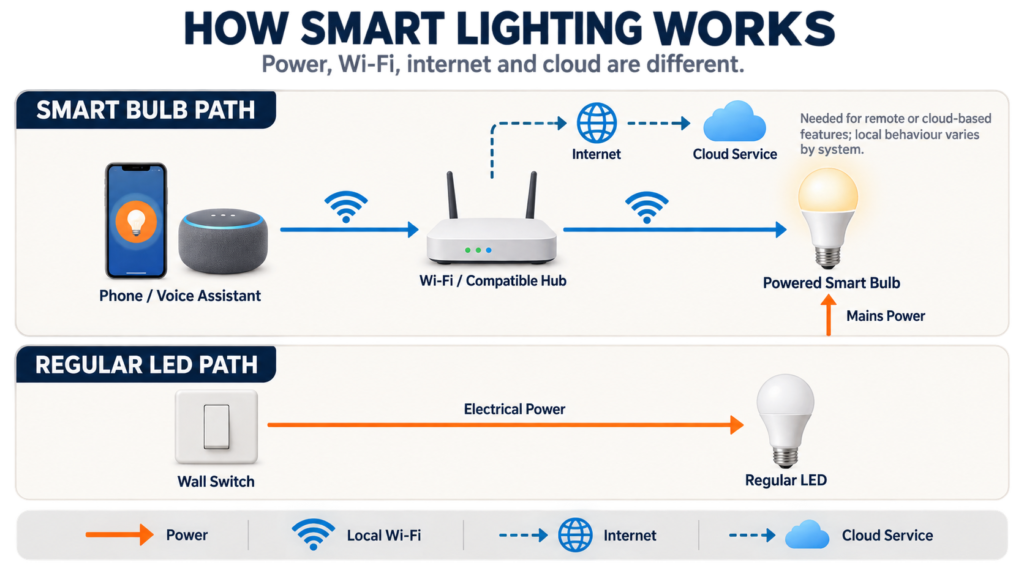
Do not mix up four dependencies:
- Power energises the bulb. No power means no light, radio or smart control.
- Wi-Fi is the local wireless network. It can exist even when the internet connection is down.
- The internet connects the home network to external services.
- Cloud is a manufacturer/platform service reached through the internet. Some products execute commands locally; others need their cloud even on the same Wi-Fi.
If Wi-Fi fails, direct Wi-Fi control normally fails, although manual switching may remain. During an internet/cloud outage, local commands and stored schedules vary by model and controller.
Smart Bulb vs Regular Bulb: Which Is Brighter?
Neither category is automatically brighter. Watts measure power; lumens measure light output.
TP-Link documents 806 lm from 8.3 W for one B22 smart bulb; Philips documents 825 lm from 9 W for a WiZ B22 model. Other 9 W bulbs may differ, and saturated RGB colours can appear dimmer than white mode.
Use this buying rule:
First choose the lumen output and light distribution needed for the room. Then compare watts, colour temperature, CRI, base, physical size and features.
A 900-lumen regular bulb can be brighter than an 800-lumen smart bulb even at similar wattage. “Smart” proves neither brightness nor efficiency.
Indian buyers can also consult the BEE Standards and Labelling Programme and check applicable BIS compliance instead of judging a bulb only by price.
Do Smart Bulbs Use More Electricity?
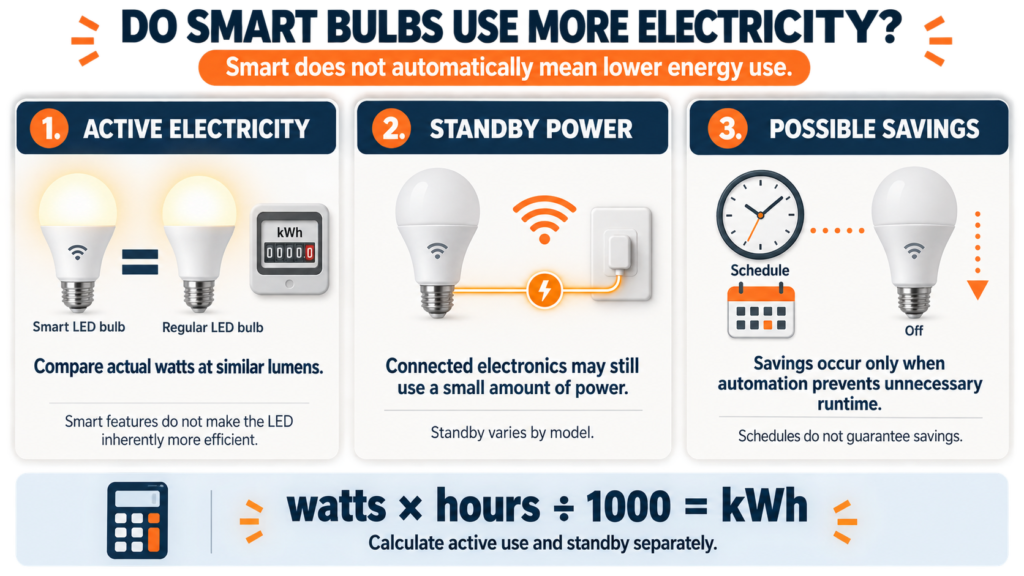
Separate energy use into three parts.
1. Active electricity
If a smart and regular LED each draw 9 W at similar lumen output, active use is essentially the same. LED technology creates the savings over older lighting; connectivity does not.
2. Standby electricity
A connected bulb remains powered while logically “off.” TP-Link specifies 0.4 W standby for the India-market L530B, a documented example rather than a universal value. Where a brand omits this figure, it is not clearly specified by the manufacturer.
3. Savings from better control
Automation saves energy only when it prevents otherwise unnecessary on-time; poorly designed routines can add runtime.
EasyFixGear annual electricity-cost example
The Central Electricity Authority publishes state-by-state tariffs and duties because Indian household rates vary by state, slab, subsidy and charges. The following uses ₹8 per kWh purely as an illustrative energy rate. Replace it with the marginal rate on your bill. Fixed charges are excluded because one bulb typically doesn’t change them.
Formula
Watts × hours ÷ 1000 = kWh
kWh × electricity rate = estimated energy cost
Scenario A: one bulb, four hours of light per day
Assumptions: both bulbs draw 9 W when lit; the smart bulb draws 0.4 W for the remaining 20 hours; 365 days; ₹8/kWh.
| Calculation | Regular 9 W LED | Smart 9 W LED |
|---|---|---|
| Active energy | 9 × 4 × 365 ÷ 1000 = 13.14 kWh | 13.14 kWh |
| Standby energy | 0 | 0.4 × 20 × 365 ÷ 1000 = 2.92 kWh |
| Illustrative annual total | 13.14 kWh | 16.06 kWh |
| At ₹8/kWh | about ₹105/year | about ₹128/year |
Standby adds about ₹23 per year. To offset 0.4 W over 20 hours, a 9 W bulb would need automation to prevent roughly 53 minutes of unnecessary daily on-time. This is an illustrative break-even, not a guarantee.
Scenario B: eight smart bulbs, three hours of light per day
Assumptions: 9 W active, 0.4 W standby for 21 hours, 365 days, ₹8/kWh.
| Calculation | Eight regular LEDs | Eight smart LEDs |
|---|---|---|
| Active energy | 9 × 3 × 365 × 8 ÷ 1000 = 78.84 kWh | 78.84 kWh |
| Standby energy | 0 | 0.4 × 21 × 365 × 8 ÷ 1000 = 24.53 kWh |
| Illustrative annual total | 78.84 kWh | 103.37 kWh |
| At ₹8/kWh | about ₹631/year | about ₹827/year |
Here, we assume standby adds about ₹196 a year. Actual models vary; do not transfer one bulb’s figure to every product.
Smart Bulb vs LED Bulb Cost
The purchase gap usually matters more than standby cost. In September 2026, Wipro displayed a regular Garnet LED from ₹65 and its 9 W Wi-Fi colour bulb at ₹589; Reliance Digital had listed the Tapo L530B at ₹639; Philips published a ₹1,999 MRP for its 9 W WiZ B22. These changing price snapshots are context, not recommendations.
For a simple planning example, compare a ₹100 regular LED with a ₹600 smart bulb:
| Quantity | Regular LEDs | Smart bulbs | Extra upfront cost |
|---|---|---|---|
| 1 | ₹100 | ₹600 | ₹500 |
| 4 | ₹400 | ₹2,400 | ₹2,000 |
| 8 | ₹800 | ₹4,800 | ₹4,000 |
Also budget for any hub/border router, wireless button or sensor; higher replacement cost; setup time; and possible ecosystem migration. Basic bulb control normally has no subscription, but broader services may. Start with one location instead of replacing every working LED.
Smart Features That Actually Matter
Scheduling
Useful for porch lights, bedtime routines and lamps often left on. Check whether schedules are local or cloud-dependent. WiZ says its schedules reside in the lights and continue without internet while powered, although an offline power cycle can disrupt time synchronisation.
Dimming
Software dimming is convenient in bedrooms, dining areas and TV rooms. Use a standard on/off supply unless the manufacturer explicitly supports an external dimmer.
Adjustable White and Colour Temperature
Tunable white provides warm ambience or cooler task light. Treat this as comfort and usability, not a medical or sleep claim.
RGB Colours
RGB suits décor, gaming and celebrations, but many users need only scheduling and dimming; a white or tunable-white model may be cheaper.
Scenes
Scenes are useful when one action sets several lights; for one bulb, they may only save brightness and colour.
Remote Control
Remote control helps with hard-to-reach lamps or checking a light away from home. It requires power and usually internet at both ends; it is not a security system.
Voice Control
Voice control can help when hands are occupied or switch access is difficult. It is optional and adds its own account/privacy considerations.
Automation
Sensors and routines can trigger low-brightness hallway light, bedtime scenes or occupancy response. Useful automation matters more than bulb count.
Do Smart Bulbs Work Without Internet?
Sometimes partly; behaviour varies.
| Condition | What it means | Likely result |
|---|---|---|
| Power off at wall | Electronics unpowered | No light or smart control |
| Wi-Fi unavailable | Direct Wi-Fi bulb is offline | Manual lighting may work; app/voice usually does not |
| Internet down | Local network remains | Supported local control may continue; cloud features fail |
| Vendor cloud down | Internet still works | Cloud-dependent features fail |
| Local hub/controller works | Local path remains | Supported commands may continue |
With WiZ local communication disabled, even same-network app control fails during an internet outage. Philips Hue says Bridge-based lighting can remain controllable offline. Matter provides local connectivity but still needs compatible controllers and network infrastructure.
Ask three questions: Does manual switching work? Do schedules run without internet? Does same-network app control work without the cloud?
Wi-Fi does not mean the same thing as internet access. Google notes that some Google Home automations depend on Wi-Fi, internet connectivity and third-party service availability.
What Happens After a Power Cut?
After an outage, a bulb may turn on, restore its previous state or use a configured power-on state.
TP-Link documents configurable Tapo default states including last-on, custom, turn-on and restore-previous-state options, while WiZ warns that very short or repeated outages can sometimes be interpreted as switch commands. These examples should not be generalised to every bulb.
Check reconnection, time synchronisation and the effect of repeated interruptions. Test recovery settings before placing a smart bulb where unexpected light would be disruptive.
The Smart Bulb Problem Nobody Should Ignore: Wall Switches
A smart bulb needs mains power to receive app, schedule or voice commands. A conventional switch cuts that power.
In families, shared flats and guest rooms, one person may use voice while another cuts power at the familiar switch; the next smart command then fails.
Reserve smart bulbs for always-powered lamps, add a compatible wireless button, or consider a professionally selected smart wall switch when conventional control matters more than bulb colour.
Do not modify fixed wiring unless qualified and authorised; renters should obtain required permission.
Smart Bulb vs Smart Switch vs Smart Plug
| Option | Best when | Main limitation | Electrical note |
|---|---|---|---|
| Smart bulb | One light needs dimming, adjustable white, colour or individual control | Loses smart control when its wall supply is off | Match base, voltage, fixture and enclosure guidance |
| Smart switch | A wall-controlled circuit or multi-bulb fixture should remain familiar to everyone | May not provide colour; compatibility, neutral wiring and load type vary | Fixed-wiring installation should be assessed and performed appropriately |
| Smart plug | A plug-in lamp needs simple on/off schedules or remote control | Usually cannot control a basic bulb’s colour; lamp’s own switch must remain on | Use only within plug/load ratings; not for fixed lighting circuits |
For plug-in lamps, see EasyFixGear’s guide to the best smart plugs in India. A smart plug is not a workaround for inappropriate fixed wiring.
Are Smart Bulbs a Privacy or Security Risk?
A typical bulb has no camera or microphone, but it adds an account, app, device identifier and network endpoint. The risk is manageable, not zero.
NCSC and FTC guidance recommends checking support periods, using unique passwords and two-step verification, securing the router, updating firmware/apps and disabling unused remote functions.
Read privacy notices and app permissions; prefer disclosed support periods; use unique passwords and two-factor authentication; update router, app and firmware; use WPA2/WPA3; and factory-reset before resale. Avoid unsupported products bought only because they are cheapest.
For connected-device security, follow basic precautions such as unique passwords, authentication, firmware updates and reviewing permissions. NIST provides practical smart-home security and privacy recommendations.
Which Lasts Longer: Smart Bulb or Regular LED?
There is no category-wide winner. Compare rated life, warranty, switching cycles and operating restrictions.
Tapo lists 15,000 hours for L530E and 25,000 for L530B; Philips lists 25,000 hours and 50,000 switching cycles for its 9 W WiZ B22. Ratings are not guarantees; heat, fixtures, voltage, drivers and usage matter.
Smart bulbs also have two kinds of life:
- Physical life: LEDs and driver still produce usable light.
- Connected life: the app, cloud, account and platform integrations remain functional and supported.
A bulb may still illuminate after losing connected features. Philips states a 60-month minimum support period for the cited WiZ model, distinct from its 25,000-hour light-source rating.
When Smart Bulbs Are Worth It
Smart bulbs add value in bedside lamps, rentals where rewiring is undesirable, scheduled bedroom or porch lighting, frequently used colour/accent light, sensor-driven hallways and locations where remote checking solves a recurring need.
For broader planning, see smart-home devices in India and a staged budget smart-home approach.
When Regular LED Bulbs Are Better
Regular LEDs are often better in utility/rarely used rooms, bathrooms, simple kitchen task lighting, fittings routinely wall-switched, large installations with little automation need and homes avoiding app dependency.
If no feature solves a real problem, no purchase is necessary.
Do You Need Smart Bulbs in Every Room?
Usually not. Choose by task, not room count.
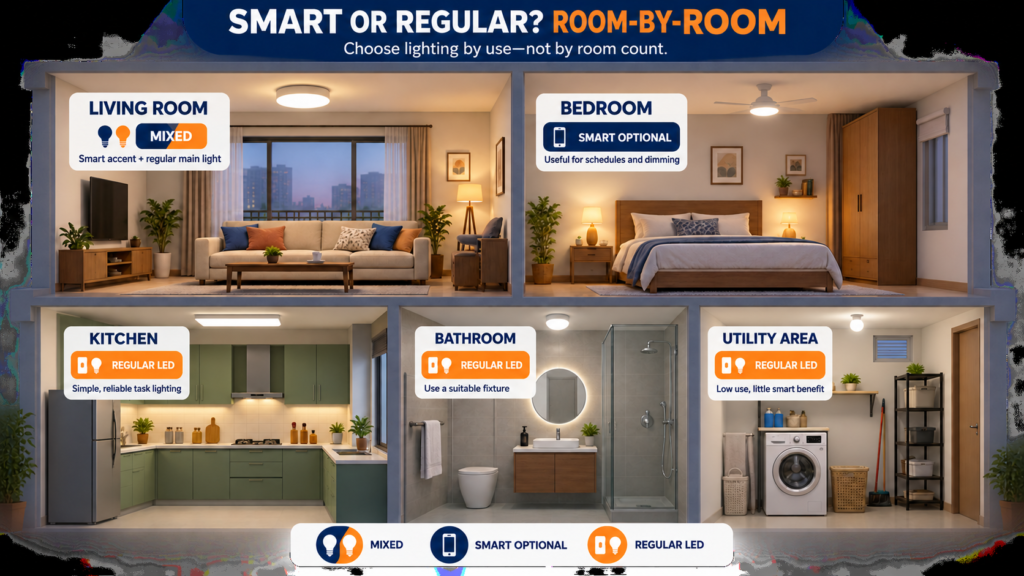
| Room/use | Smart bulb | Regular LED | Why |
|---|---|---|---|
| Living room | Mixed | Mixed | Smart accent, simple main light. |
| Bedroom | Often useful | Suitable | Schedules and dimming add value. |
| Study | Optional | Often best | Stable task light matters most. |
| Kitchen | Rarely needed | Usually best | Reliable task lighting. |
| Bathroom | Rarely needed | Usually best | Limited smart value; use suitable fixtures. |
| Hallway | With automation | Good | Sensors can help. |
| Balcony/porch | With schedules | Good | Outdoor suitability comes first. |
| Utility room | Rarely useful | Usually best | Low use, little benefit. |
| Bedside lamp | Strong candidate | Fine | Convenient dimming/control. |
How to Decide: Smart Bulb or Regular LED?
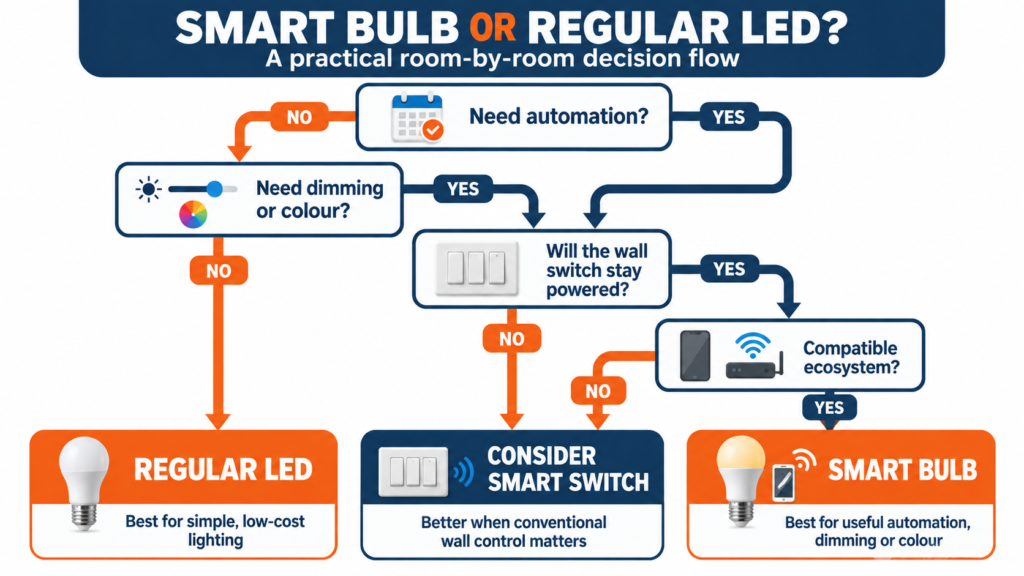
Ask in order:
- Need automation? Name the exact routine.
- Need dimming or colour? If only on/off is needed, compare a switch or plug.
- Will the wall switch remain powered? If not, smart control will frustrate.
- Does the network/platform support it? Check 2.4 GHz, hub, Thread, Matter and ecosystem requirements.
- Is an app/account acceptable to everyone?
- Is the extra cost justified here? Price one, four and eight bulbs.
- Would a smart switch work better? Especially for multi-bulb fixtures.
- Is smart lighting needed here at all?
Common Buying Mistakes
- Comparing watts instead of lumens or assuming smart means efficient.
- Replacing every LED unnecessarily.
- Ignoring 2.4 GHz requirements; the cited Tapo and WiZ models document 2.4 GHz.
- Buying the wrong B22/E27 base or bulb size.
- Forgetting wall-switch behaviour.
- Assuming all features work without internet.
- Treating Alexa, Google, Apple Home, Matter and brand apps as interchangeable.
- Ignoring support/privacy policies.
- Paying for RGB when dimmable white is enough.
- Using an incompatible dimmer or unsuitable fixture.
EasyFixGear Practical Recommendation
Make regular LEDs the default and add smart bulbs for a repeated benefit such as bedside dimming, schedules, useful colour or sensor automation. Start with one; confirm that people leave it powered, Wi-Fi is reliable and the feature remains useful. Expand only where the result is clearly better.
Final Verdict: Are Smart Bulbs Worth It?
Worth it if: you will use automation, remote control, dimming, tunable white or colour, and the bulb can remain powered.
Probably not worth it if: you need simple on/off light, the wall switch is frequently used, or you expect automatic energy savings.
Best value: in the smart bulb vs regular bulb decision, keep regular LEDs for general lighting and add smart bulbs where control solves a daily problem.
Frequently Asked Questions
1. Are smart bulbs worth it?
Selectively. They suit useful schedules, dimming, colour and automation. Regular LEDs suit low cost and simple switching.
2. Do smart bulbs use more electricity than regular LED bulbs?
Compare watts at similar lumens. Smart bulbs are not inherently more efficient and normally use standby power while logically off.
3. Do smart bulbs consume electricity when switched off?
Usually yes when turned off by app but still powered. TP-Link specifies 0.4 W for one L530B version; other models vary.
4. Do smart bulbs work without Wi-Fi?
Manual power cycling may illuminate them, but Wi-Fi app, voice and automation functions may fail. Other protocols vary.
5. Do smart bulbs work without internet?
Some local controls and schedules continue; cloud remote control may not. Verify the model because Wi-Fi, internet and cloud are separate.
6. Can I use a smart bulb with a normal wall switch?
Yes, but switching it off cuts power and disables smart control. Consider a compatible wireless control or appropriate smart switch.
7. Do smart bulbs last as long as regular LED bulbs?
Compare rated hours and warranty. Connected features can lose support before the LEDs physically fail.
8. Can smart bulbs save electricity?
Only if automation prevents unnecessary runtime. LED-upgrade savings come from LED technology; include standby in calculations.
9. Do I need Alexa or Google Home to use a smart bulb?
Usually not; many use a manufacturer app. Check Apple Home, Matter and hub requirements by model.
10. Is a smart bulb or smart switch better?
A bulb suits individual dimming/colour; a switch can suit conventional control or multi-bulb fixtures. Handle fixed wiring appropriately.
How We Researched
EasyFixGear reviewed India-market manufacturer pages, BEE lighting material, CEA tariff publications, official Matter/Google/Apple documents, outage guidance and NCSC/FTC security advice. Specifications and prices were not independently measured. Verify current price, firmware and support for the exact model.
Last updated: 22 September 2026 | Specifications, prices and platform support checked against cited sources.